NativeScript / NativeScript/NativeScript
Weird behavior when using textWrap and FlexboxLayout
@tsonevn is already working on this.
Since Dec 31, 2018.
- Dominant language
- TypeScript
- Stars
- 25.7k
- Forks
- 1.7k
- Avg merge
- 1d 5h
- Merged PRs (30d)
- 35
Description
Environment
Provide version numbers for the following components (information can be retrieved by running tns info in your project folder or by inspecting the package.json of the project):
-
CLI: 5.0.1
-
Cross-platform modules: 5.1.1
-
Android Runtime: 5.0.0
-
iOS Runtime: 5.0.0
-
Plugin(s):
"nativescript-angular": "^7.0.3",
"nativescript-audio": "^4.3.5",
"nativescript-bottom-navigation": "^1.3.0",
"nativescript-checkbox": "^3.0.3",
"nativescript-feedback": "^1.2.0",
"nativescript-localize": "^3.0.6",
"nativescript-masked-text-field": "^3.0.2",
"nativescript-ng-ripple": "^2.0.0",
"nativescript-pager": "^8.0.2",
"nativescript-plugin-firebase": "^7.6.0",
"nativescript-purchase": "^2.0.5",
"nativescript-sqlite": "^2.2.1",
"nativescript-telephony": "^1.0.4",
"nativescript-theme-core": "~1.0.4",
"nativescript-tslib": "^1.9.1-r1",
"nativescript-ui-autocomplete": "^3.9.0",
"nativescript-ui-calendar": "^3.7.0",
"nativescript-ui-chart": "^3.7.0",
"nativescript-ui-gauge": "^3.6.0",
"nativescript-ui-listview": "^5.0.0",
"nativescript-ui-sidedrawer": "^4.3.0",
Describe the bug
I'm trying to create a component using FlexboxLayout with a fixed sized rectangle to the left and a variant size label to the right with the textWrap property enabled, so if the right label text increase its length there will be a line break but that makes the left rectangle to be narrowed.
The template layout is like follows:
<StackLayout width="80%" id="synchPointsAvailable">
    <Label id="countWith" text="{{'membership.buy-gift-view.you-count-with' | L}}"></Label>
    <FlexboxLayout backgroundColor="blue" width="100%" flexDirection="row" alignItems="center">
        <AbsoluteLayout backgroundColor="green" id="synchPointsContainer">
            <FlexboxLayout id="synchPointsCircle" alignItems="center" justifyContent="center">
                <Label id="synchPoints" [text]="synchPoints | humanFormat"></Label>
            </FlexboxLayout>
            <StackLayout id="bubble1">

            </StackLayout>
            <StackLayout id="bubble2">

            </StackLayout>
        </AbsoluteLayout>
        <Label id="synchPointsLabel" flexGrow="1" text="{{'membership.buy-gift-view.synch-points' | L}}" textWrap="true"></Label>
    </FlexboxLayout>

</StackLayout>
And the SCSS file that style it is:
#synchPointsAvailable {
    #countWith {
        font-size: 18;
        color: $accent-color;
        text-transform: uppercase;
    }

    #synchPointsLabel {
        margin-left: 15;
        font-size: 20;
        color: $dark-primary-color;
        text-transform: uppercase;
    }

    #synchPointsContainer {
        width: $pointsContainerSize;
        height: $pointsContainerSize;

        #synchPointsCircle {
            width: 100%;
            height: 100%;
            border-radius: 150;
            border-width: 3;
            border-color: $dark-primary-color;

            #synchPoints {
                text-align: center;
                color: $accent-color;
            }
        }

        #bubble1,
        #bubble2 {
            width: $bubbleSize;
            height: $bubbleSize;
            border-radius: 100;
            background-color: $dark-primary-color;
        }

        #bubble1 {
            top: 3;
            left: 3;
        }

        #bubble2 {
            top: $pointsContainerSize - $bubbleSize - 3;
            left: $pointsContainerSize - $bubbleSize - 3;
        }

        #synchPoints {
            font-size: 40;
        }
    }
}
This gives me the following result:
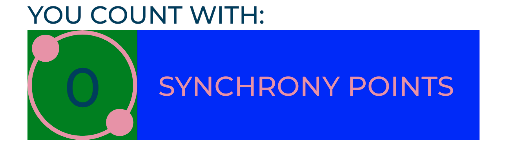
But if i increase the size of the #synchPointsLabel from 20 to a higher value (for example 24) that makes a line break but also (and what i don't expect) cut off the width of the green rectangle:
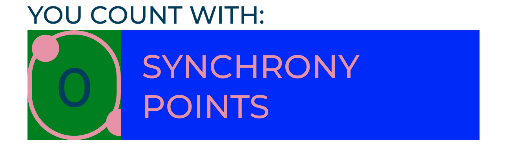
Is like the overflow of the Label text (that makes the textWrap happen) is substracted in the left rectangle.
Note
I discover that if i use a fixed width in the Label that do not happen but this must be unnecessary a solution
To Reproduce
I created an Angular project and tested it using a Genymotion emulator with Android 8.0
Expected behavior
The green rectangle must not be cropped when there is a line break of the blue label.
Sample project
Here is a play project with all the code for reproduce the problem
Want to back this issue? Post a bounty on it! We accept bounties via Bountysource.
Contributor guide
First steps
- Read the whole issue, then the project's contributing guide.
- Comment on the issue to say you are picking it up — it saves two people doing the same work.
- Fork the repository and make your change on a branch.
- Open a pull request that references the issue number.
Assessment
This issue has not been assessed yet.