NatLabRockies / NatLabRockies/EnergyPlus
Wind speed clarification for HybridVentilation (and AirflowNetwork) model
Nobody has claimed this yet.
- Dominant language
- C++
- Stars
- 1.6k
- Forks
- 490
- Avg merge
- 6d 21h
- Merged PRs (30d)
- 22
Description
Issue overview
In the AirflowNetwork model, for hybrid ventilation availability manager, there is an input for the max wind velocity. There is some ambiguity here in that normally users would think it is the wind speed in the weather file. However, in the current EnergyPlus implementation, it is actually referring to the “Zone” wind speed, which is calculated at Zone height.
Since the terrain boundary layer model is used in EnergyPlus, a vertical profile of the wind velocity is assumed. Therefore, the “Zone” wind velocity is typically not the same as the "Site" (weather file) wind speed which is measured at a reference height (e.g. 10m). This difference can be demonstrated in the example file HybridVentilationControl.idf. In the tested file, the “Zone” wind speed which is calculated at zone height, is only about half of that of the “Site” (weather data) wind speed.
In the HybridVentilationControl.idf example, by changing the max wind velocity field value to 5m/s and 2.5m/s, it can be demonstrated that what the AirflowNetwork model and the AvailabilityManager:HybridVentilation are actually using for this ventilation control is the “Zone” wind speed to do the control. With the weather (actually sizing input) input of 5.3 m/s for “Site” wind velocity, surpassing the 5m/s cutoff max wind speed in AvailabilityManager:HybridVentilation, the hybrid ventilation does not shut off (which seems quite unexpected at a first glance):
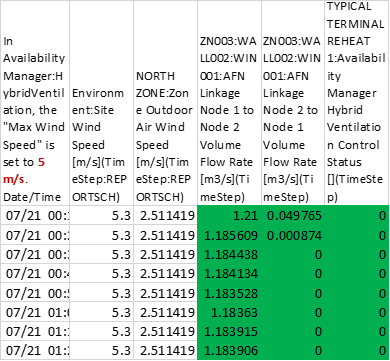
This is really because the “North Zone” site wind speed is only 2.51 m/s, which is smaller than the 5 m/s shut off input value in the AvailabilityManager:HybridVentilation in this case.
Here is another revision by setting the max wind speed in the AvailabilityManager:HybridVentilation to only 2.5 m/s, which is lower than the “site” wind speed of 5.3 m/s. However, since it is higher than the North “zone” wind speed of 2.32 m/s, it will cause the HybridVentilation to be shut off (to the minimum), as demonstrated by the results below:
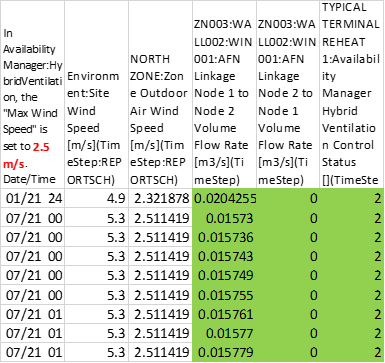
Therefore, to the minimum, it is suggested to add some clarifications on the I/O Reference documentation (e.g. Page 2084, Section 1.48.11.1.6), which states:
1.48.11.1.6 Field: Maximum Wind Speed
This is the wind speed (m/s) above which hybrid ventilation is shut off. This can help simulate
conditions where one would normally close windows to avoid wind problems in a space (papers blowing
around, etc).
Since EnergyPlus also uses (and even allows the output of) other wind velocities, such as the “zone” wind velocity”, and even the “surface” wind velocity. Some clarifications should be added to the description above to clarify it is currently referring to the “zone” wind speed.
This suggestion could also be applied to note for the max wind velocity field in the Energy+.idd file, saying that it is the local (zone) wind velocity.
Further, this could become a new feature request to allow the user to determine (to select the input) whether to use the local (zone or surface) wind velocity or the site (e.g. weather data) wind velocity for the AvaiablailtyManager:HybridVentilation.
There might also a few other places other than AirflowNetwork in EnergyPlus that might have need a careful distinction between the “site” wind speed, and the “zone” or “surface” level wind speed. If needed, similar caution and scrutiny may also be needed as well.
Details
Some additional details for this issue (if relevant):
- Platform (Operating system, version): All
- Version of EnergyPlus (if using an intermediate build, include SHA): 9.2-9.4, probably all as well
- Helpdesk ticket number 15622
Checklist
Add to this list or remove from it as applicable. This is a simple templated set of guidelines.
- Defect file added (list location of defect file here)
- Ticket added to Pivotal for defect (development team task)
- Pull request created (the pull request will have additional tasks related to reviewing changes that fix this defect)
Contributor guide
First steps
- Read the whole issue, then the project's contributing guide.
- Comment on the issue to say you are picking it up — it saves two people doing the same work.
- Fork the repository and make your change on a branch.
- Open a pull request that references the issue number.
Research direction
Start with the I/O Reference at section 1.48.11.1.6 and the corresponding field in Energy+.idd. Use the HybridVentilationControl.idf example to confirm that the documented Maximum Wind Speed refers to the zone wind velocity, then update both descriptions so the distinction from site wind speed is explicit.
Written by the indexing model from the issue text.
Assessment
- Domain
- documentation
- Issue type
- Documentation
- Difficulty
- 2/5
- Estimated time
- 1-3 hours
- Activity status
- Stale
- Clarity
- Mostly clear
- Newbie friendliness
- 35/100