Video reader artifacts
Nobody has claimed this yet.
- Dominant language
- C++
- Stars
- 5.8k
- Forks
- 678
- Avg merge
- 3d 1h
- Merged PRs (30d)
- 27
Description
Pipe definition:
@pipeline_def
def video_pipe(filenames):
    side_size = 224
    crop_size = 224
    sequence_length = 32
    sampling_rate = 4
    random_shuffle = False
    device = 'gpu'

    video, labels = fn.readers.video_resize(
        device="gpu", filenames=filenames, labels=[], sequence_length=sequence_length, random_shuffle=random_shuffle,
        skip_vfr_check=True, size=(side_size, side_size), mode='not_smaller', name='Reader',
        dtype=types.FLOAT, normalized=True, stride=sampling_rate,
        pad_sequences=True
    )
    video = fn.crop(video, crop=(crop_size, crop_size),
                    crop_pos_x=0.5, crop_pos_y=0.5, device=device)

    return video, labels
I have a dataset of 5 tiktok videos. Whenever I iterate over this dataset I can notice different collisions and artifacts on frames. Moreover, sometimes frames one video appear in sequence of another video, for example frames from video with label 1 (house) appear in sequence with returned label 2 (video with a woman and clothes).
I have noticed, that this collisions happen only around video with label 2 (kjbelll_6987115080580107525.mp4). However if I pass to the pipe only this video everything works as expected.
I attach example of collisions and a dataset.
I pass the videos to the pipe in this exact order:
[
    'thepetcollective_6850180418818346246.mp4',
    'bigvarn_6925039213402426629.mp4',
    'kjbelll_6987115080580107525.mp4',
    'josemiguelsal_6840197131358194950.mp4',
    'tobyporterart_6838650165688028421.mp4'
]
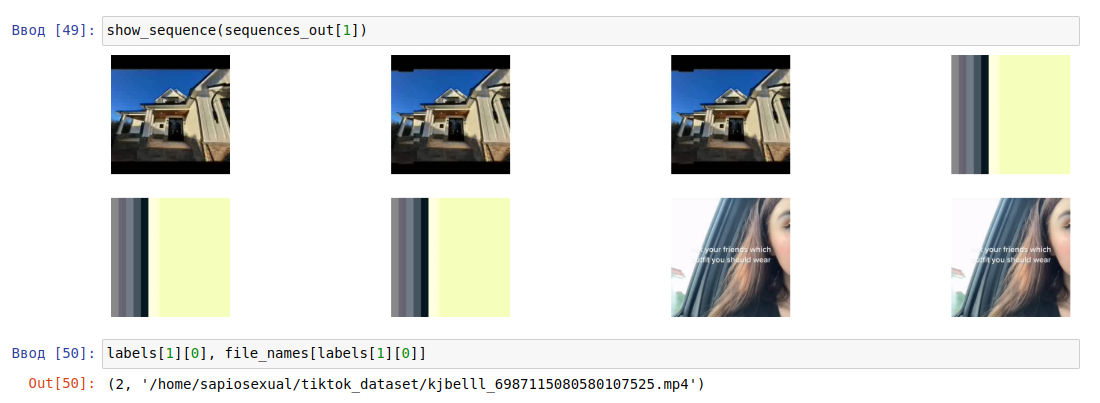

What causes this behavior? Can you do something about it?
Is there a way to filter out videos that break everything?
Contributor guide
First steps
- Read the whole issue, then the project's contributing guide.
- Comment on the issue to say you are picking it up — it saves two people doing the same work.
- Fork the repository and make your change on a branch.
- Open a pull request that references the issue number.
Assessment
This issue has not been assessed yet.