NUKnightLab / NUKnightLab/TimelineJS3
Setting Colour Flags by Group in v3.8.21
Nobody has claimed this yet.
- Dominant language
- JavaScript
- Stars
- 3.2k
- Forks
- 645
- PR merge metrics
- No merged PRs in 30d
Description
The code below provides a method of setting the colour of the Marker Flag by group using CSS. It is based on the code given in #489 which was written for v3.6.5.
The setMarkerGroup Function should be placed after the positionMarkers function and before the updateDisplay function,
(Insert Approx Line No 6146 in formated timeline.js file downloaded as zip file bundle from Knightlab).
Two calls are made to the function and should be inserted following each call to positionMarkers function
(drawTimeLine & updateDrawTimeLine - approx lines 6432 & 6449).
Javascript
                setMarkerGroup() {
                    function slugify(string) {
                        return string
                            .toString()
                            .trim()
                            .toLowerCase()
                            .replace(/\s+/g, "-")
                            .replace(/[^\w\-]+/g, "")
                            .replace(/\-\-+/g, "-")
                            .replace(/^-+/, "")
                            .replace(/-+$/, "");
                        }
					for (var i = 0; i < this._markers.length; i++)
					{
					if (this._markers[i].data.group.length > 0 )
                    {
                        var groupClass = 'tl-timemarker-group-' + slugify(this._markers[i].data.group);
					this._markers[i]._el.container.classList.add(groupClass);
					}
					}
				}
This will support additional CSS for each group to colour the background of each marker flag in the group. If a group is not given a specific background colour, the default will be applied, similarly any events not in a group will use default colour. (from original CSS or a custom CSS for default).
Note: The 'slugify' code means that 'group' names are converted to lower case and spaces replaced by '-' (hyphen/minus sign)
e.g 'Rest of the World' becomes 'rest-of-the-world' ; (see Git Hub or web for numerous options here)
CSS
/* Development - Coloured Flags for each Media Type
=================================================*/
.tl-timemarker-group-video .tl-timemarker-content-container {
	color: #000000;
	background-color: rgba(255, 0, 0, .5)   /*  50% opaque red */
}
.tl-timemarker-group-audio .tl-timemarker-content-container {
	background-color: rgba(0, 0, 255, .25)  /*  25% opaque blue */
}
.tl-timemarker-group-html .tl-timemarker-content-container {
	color: #000000;
	background: rgba(0, 255, 0, .1)        /*  10% opaque green */
}
.tl-timemarker-group-image .tl-timemarker-content-container {
	**color: #000000;**
	background-color: purple;
The above CSS was used to create the screenshot below which is from the Media Types timeline.
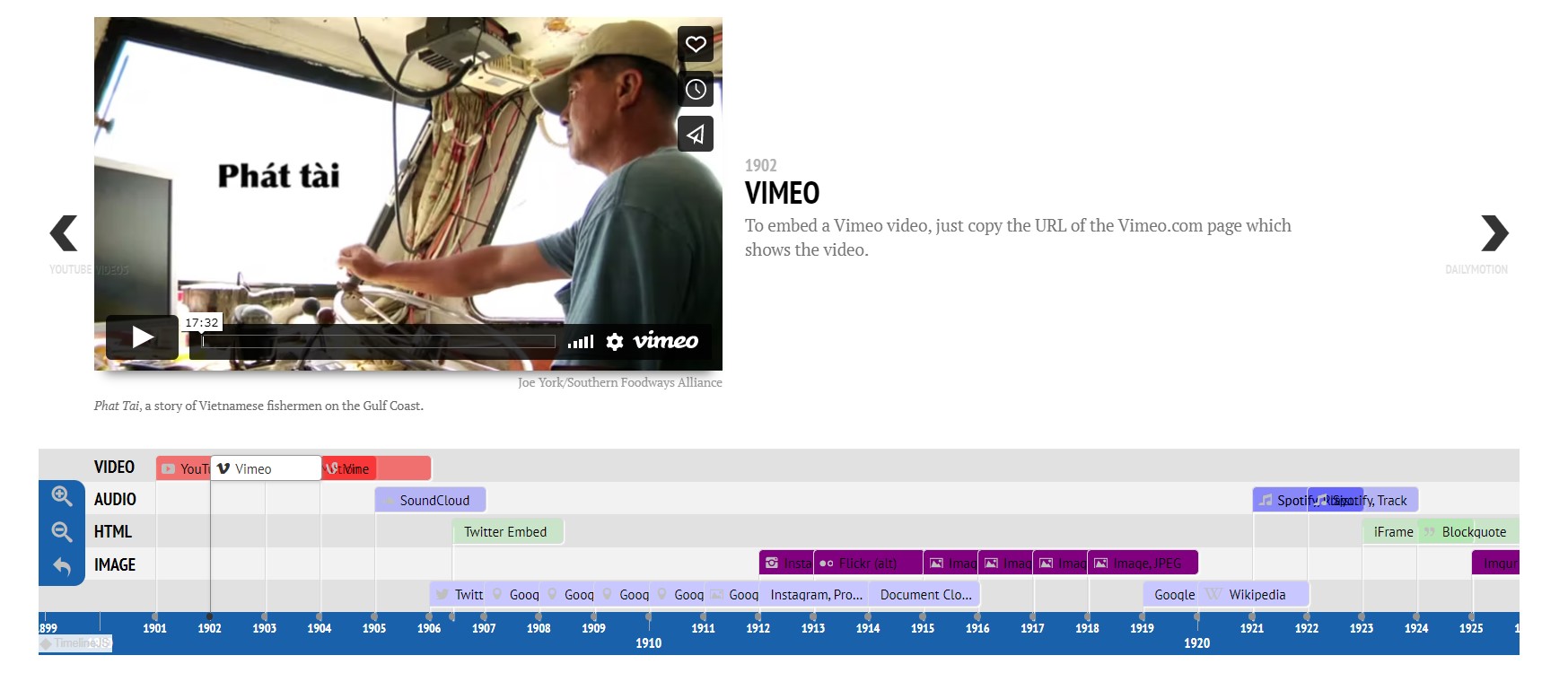
Note: Some additional CSS mods on layout.
Contributor guide
First steps
- Read the whole issue, then the project's contributing guide.
- Comment on the issue to say you are picking it up — it saves two people doing the same work.
- Fork the repository and make your change on a branch.
- Open a pull request that references the issue number.
Research direction
Start in the formatted timeline.js bundle near positionMarkers, updateDisplay, drawTimeLine, and updateDrawTimeLine, using the insertion points described in the issue. Check how marker data exposes group names and how marker containers receive classes. Done means grouped markers receive predictable CSS classes and the supplied CSS can apply distinct colours while ungrouped markers retain the default.
Written by the indexing model from the issue text.
Assessment
- Tech stack
- javascript
- Domain
- frontend
- Issue type
- Feature
- Difficulty
- 2/5
- Estimated time
- 1-3 hours
- Activity status
- Quiet
- Clarity
- Clearly specified
- Newbie friendliness
- 35/100