Measurement template auto hide no matter what
Nobody has claimed this yet.
- Dominant language
- JavaScript
- Stars
- 16
- Forks
- 9
- PR merge metrics
- No merged PRs in 30d
Description
Hello,
Module version : 0.11.0 (previous version did the same thing)
FVTT version 0.6.4
Using the app itself
Bug description
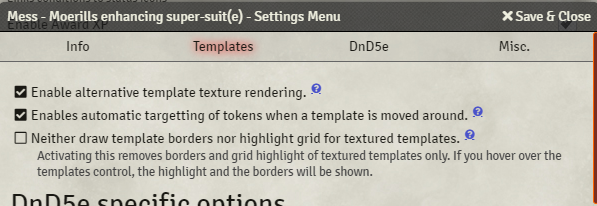
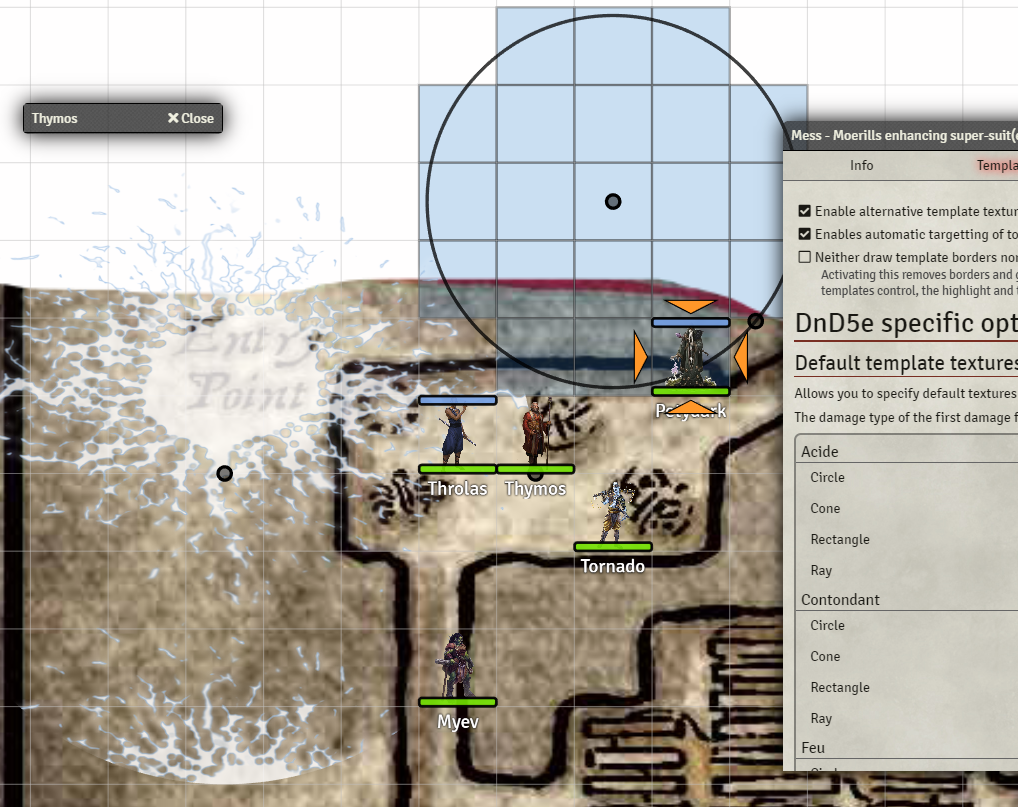
- When a non textured template get placed on the map, the radius and default template get hidden. I have tried to check or uncheck the "Neither draw template border nor highlight grid for texture templates" but it does not change anything. The template always auto-hide.
What should've happened?
- Template border should still be visible or highlighted
Console errors? (F12 or F11 in most browsers)
- None
Workflow to recreate the bug
- Place a textured template, with the option "Neither draw...." unchecked.
- Place a non textured template (not affected by mess and always visible.
Helpful videos or screenshots if possible
Either activate notifications, stay active or post your discord handle so i can get back to you for further questions
Toldoth#4985, it is not urgent :)
Thanks!
Contributor guide
No contributing guide indexed for this repository
First steps
- Read the whole issue, then the project's contributing guide.
- Comment on the issue to say you are picking it up — it saves two people doing the same work.
- Fork the repository and make your change on a branch.
- Open a pull request that references the issue number.
Research direction
Reproduce the workflow in Foundry VTT 0.6.4 by placing a textured template followed by a non-textured template with the visibility option unchecked. Trace the template visibility behavior, and consider the issue done when the non-textured template's border or highlight remains visible as expected.
Written by the indexing model from the issue text.
Assessment
- Tech stack
- javascript
- Domain
- frontend
- Issue type
- Bug
- Difficulty
- 3/5
- Estimated time
- 1-2 days
- Activity status
- Stale
- Clarity
- Mostly clear
- Newbie friendliness
- 35/100