MirrorNetworking / MirrorNetworking/Mirror
ObjectDestroyMessage for DontDestroyOnLoad objects lost during Scene switch
Nobody has claimed this yet.
- Dominant language
- C#
- Stars
- 6.3k
- Forks
- 870
- PR merge metrics
- No merged PRs in 30d
Description
Describe the bug
When changing scenes, all clients are set to not ready. The method used for this is SetClientNotReady. This method removes all observers for the client connections. When calling NetworkServer.Destroy(someGameobject); (where someGameobject is part of DontDestroyOnLoad) immediately on the host/server after a scene change, the clients won't be ready yet, and they won't be part of the observers of the someGameobject, thus the ObjectDestroyMessage will be lost on clients that are still loading.
(I guess that most probably all types of messages will be lost during this phase, but it's most severe for ObjectDestroyMessage, since they will then just continue to be zombie objects on the clients forever/until the game is closed.)
How to reproduce the issue, step by step
The problem can easily be reproduced by inserting one line of code, and then be replicated by using the "Room" example provided by Mirror. (So obviously if you are going to build the project add the three scenes of "Room" to the build settings, however, I would recommend using two Unity editor instances, since it allows you to see any transforms in the scene.) In the NetworkRoomManager.cs, in line 192 insert the following line of code: NetworkServer.Destroy(roomPlayer);
Then the method SceneLoadedForPlayer should look like this
        void SceneLoadedForPlayer(NetworkConnection conn, GameObject roomPlayer)
        {
            // Debug.LogFormat(LogType.Log, "NetworkRoom SceneLoadedForPlayer scene: {0} {1}", SceneManager.GetActiveScene().path, conn);

            if (IsSceneActive(RoomScene))
            {
                // cant be ready in room, add to ready list
                PendingPlayer pending;
                pending.conn = conn;
                pending.roomPlayer = roomPlayer;
                pendingPlayers.Add(pending);
                return;
            }

            GameObject gamePlayer = OnRoomServerCreateGamePlayer(conn, roomPlayer);
            if (gamePlayer == null)
            {
                // get start position from base class
                Transform startPos = GetStartPosition();
                gamePlayer = startPos != null
                    ? Instantiate(playerPrefab, startPos.position, startPos.rotation)
                    : Instantiate(playerPrefab, Vector3.zero, Quaternion.identity);
            }

            if (!OnRoomServerSceneLoadedForPlayer(conn, roomPlayer, gamePlayer))
                return;

            NetworkServer.Destroy(roomPlayer); //THIS LINE IS THE ONLY CHANGE COMPARED TO ORIGINAL MIRROR

            // replace room player with game player
            NetworkServer.ReplacePlayerForConnection(conn, gamePlayer, true);
        }
Now, the next steps are quite simple:
- Host with the first instance. This instance will be referred to as "host".
- Join as a client to localhost on the seond instance (this instance should be run in the Unity editor, since it allows you to see the GameObjects in the scene). This instance will be referred to as "client"
- Click ready on the client.
- Click ready on the host.
- Click start on the host.
- Now on the client, in the
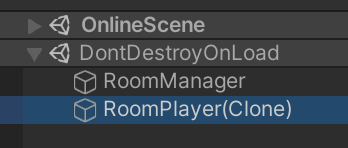
DontDestroyOnLoadscene object, there will a child called "RoomPlayer(Clone)". If you take a closer look, it will have the index 0 in the NetworkRoomPlayerExt script, meaning this is the RoomPlayer object of the host, that has been destroyed while the client was still loading (or at least while the host has not yet processed the ready message). This RoomPlayer object will live on until the game is closed in a zombie-like state, because the host thinks it has already been destroyed, and thus won't send any new Messages for it. - On the host all RoomPlayer objects will have been deleted.
You can also try running 3 or more instances. Using n instances, one instance will have n-1 zombie RoomPlayers, another instance will have n-2 zombie RoomPlayers, the next one n-3 zombie RoomPlayers and so on. Only on the host all RoomPlayers have been destroyed.
Expected behavior
Calling NetworkServer.Destroy(something); should destroy something on all clients, even when called during a Scene change.
Screenshots
The client will still see a RoomPlayer, even though it should have been destroyed:
Desktop:
- OS: Windows 10
- Build target: Windows x86, standalone
- Unity version: 2019.4.22f1
- Mirror branch: master (v35.0.1)
Additional context
I am going to submit a pull request for a fix I made myself soon. This issue should help highlight the reasons for the changes.
Contributor guide
First steps
- Read the whole issue, then the project's contributing guide.
- Comment on the issue to say you are picking it up — it saves two people doing the same work.
- Fork the repository and make your change on a branch.
- Open a pull request that references the issue number.
Research direction
Start with NetworkRoomManager.cs and its SceneLoadedForPlayer method, then trace SetClientNotReady and NetworkServer.Destroy during a scene change. Reproduce the issue with the Room example using two Unity instances. Done means destroying a DontDestroyOnLoad object sends ObjectDestroyMessage to clients still loading, leaving no zombie RoomPlayer objects.
Written by the indexing model from the issue text.
Assessment
- Tech stack
- csharp, unity
- Domain
- networking
- Issue type
- Bug
- Difficulty
- 4/5
- Estimated time
- 3-5 days
- Activity status
- Stale
- Clarity
- Clearly specified
- Newbie friendliness
- 35/100