MicrosoftEdge / MicrosoftEdge/WebView2Feedback
Search box outside the bounds of the WebView2
Nobody has claimed this yet.
- Dominant language
- PowerShell
- Stars
- 526
- Forks
- 67
- PR merge metrics
- No merged PRs in 30d
Description
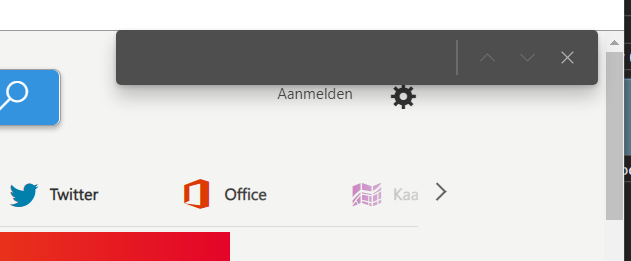
When using CTRL+F to show the page search box, the search box isn't bound to the corresponding WebView2. When I move the window of my application, the search box will remain at the same position on the screen:
Before moving:
After moving:
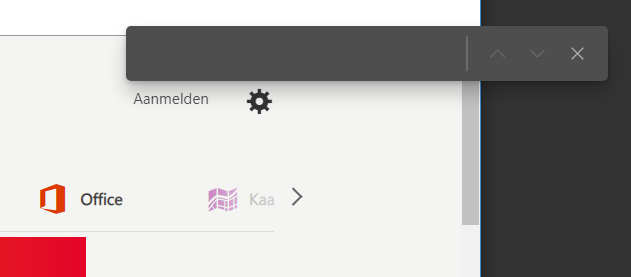
Additionally, if I place the WebView2 in a TabControl, the search box will still be visible, even if the tab with that WebView2 is hidden.
Version
SDK: v1.0.674-prerelease
Runtime: edge canary 88.0.690.0
Framework: WPF
OS: Win10
Repro Steps
- Create window with TabControl
- add 2 tabs with WebView2 content
- press CTRL+F to show the search box
- move the window or switch tabs
Expected: search box should stay with the WebView2.
Contributor guide
No contributing guide indexed for this repository
First steps
- Read the whole issue, then the project's contributing guide.
- Comment on the issue to say you are picking it up — it saves two people doing the same work.
- Fork the repository and make your change on a branch.
- Open a pull request that references the issue number.
Research direction
Start with the WPF repro using a TabControl containing two WebView2 instances, then run the CTRL+F, window-move, and tab-switch steps. Verify that the search box follows its WebView2 and is hidden when that tab is not selected; compare behavior with the stated SDK and runtime versions.
Written by the indexing model from the issue text.
Assessment
- Domain
- desktop
- Issue type
- Bug
- Difficulty
- 4/5
- Estimated time
- 3-5 days
- Activity status
- Stale
- Clarity
- Clearly specified
- Newbie friendliness
- 35/100