MicrosoftEdge / MicrosoftEdge/WebView2Feedback
Problems when accessing host object added with AddHostObjectToScript
@Lakshmisha-KS is already working on this.
Since Mar 3, 2025.
- Dominant language
- PowerShell
- Stars
- 526
- Forks
- 67
- PR merge metrics
- No merged PRs in 30d
Description
Description
I have been trying to evaluate the host object functionality provided by WebView2, and have encountered some problems.
Problem 1: Initial function call to the host object doesn't seem to return output synchronously
Problem 2: After some successful calls to the host object it fails with output in the console
Previously we have been using the corresponding functionality in the WebBrowser component, and it would be really nice if we could reuse our current extension more or less directly in webview2.
Version
SDK: 0.9.538
Runtime: 87.0.658.0 dev
Framework: Win32
OS: Win10
Repro Steps
During my experiments I have made a simple class just for testing.
My class only implements a simple function 'add' which takes two parameters and return the result through an out parameter :
HRESULT __stdcall add(long param1, long param2, long* result);
For me (since I work in native Win32) a lot of boiler plate code and a type library is needed around this to make it accessable from javascript.
I register my object after the webview is created using the name "test":
WebView->AddHostObjectToScript(L"test", &varDisp);
And load this simple html file into the browser to test:
<html>
    <head>
        <title>Demo Edge HostObject</title>
        <script type="text/javascript">
            var test  = chrome.webview.hostObjects.test;
            function add()
            {
                var param1 = Number(document.getElementById("par1").value),
                    param2 = Number(document.getElementById("par2").value),
                    result = test.add(param1, param2);
                document.getElementById("res").value = result;
            }
        </script>
    </head>
    <body>
        <div id="tabContext" class="tabcontent">
            <h1>HostObject:</h1>
            <button onclick="add()">add</button>
            <input type="text" id="par1" value="1">
            <input type="text" id="par2" value="2"> =
            <input type="text" id="res" value="">
        </div>
    </body>
</html>
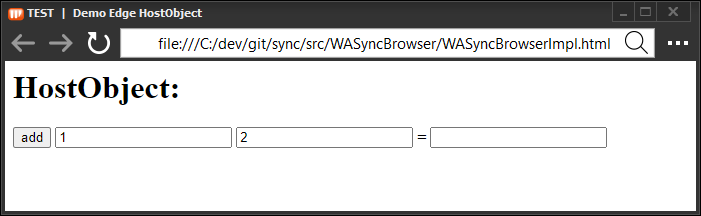
Problem 1
The first time I press 'add' this happens:

The result in the GUI is already present when the debugger stops at my breakpoint in the host object add implementation.
This makes me suspect that the result is lost due some asyncrocity during this first call.
If I press 'add' one more time the expected happens:
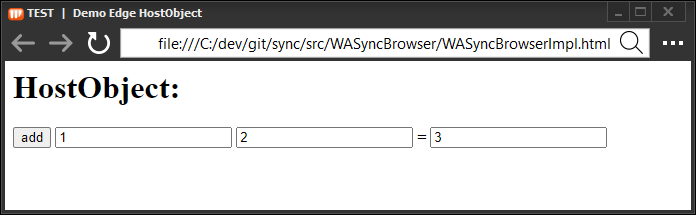
Note that if I change the html file and use the "full path" to access the add function
result = chrome.webview.hostObjects.test.add(param1, param2);
each press on the 'add' button will "lose the result"
Problem 2
After trying out the add function for a litte while it suddenly fails with this output in the console:
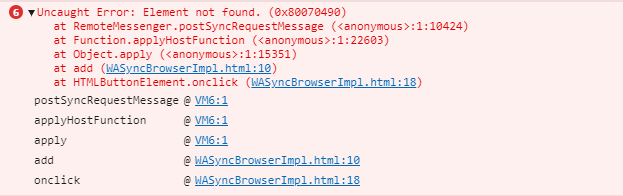
Note that in this case the call never reaches my host object (which still is alive and kicking)
I can try another cycle if I refresh the webview
Contributor guide
No contributing guide indexed for this repository
First steps
- Read the whole issue, then the project's contributing guide.
- Comment on the issue to say you are picking it up — it saves two people doing the same work.
- Fork the repository and make your change on a branch.
- Open a pull request that references the issue number.
Assessment
This issue has not been assessed yet.