MicrosoftEdge / MicrosoftEdge/WebView2Feedback
IsUserInitiated on navigation event does not work for backwards/forwards
Nobody has claimed this yet.
- Dominant language
- PowerShell
- Stars
- 526
- Forks
- 67
- PR merge metrics
- No merged PRs in 30d
Description
Setup
- WPF application
- .Net 4.7.2
- 0.9.579-prerelease package for WebView
- Edge Dev installed
Problem
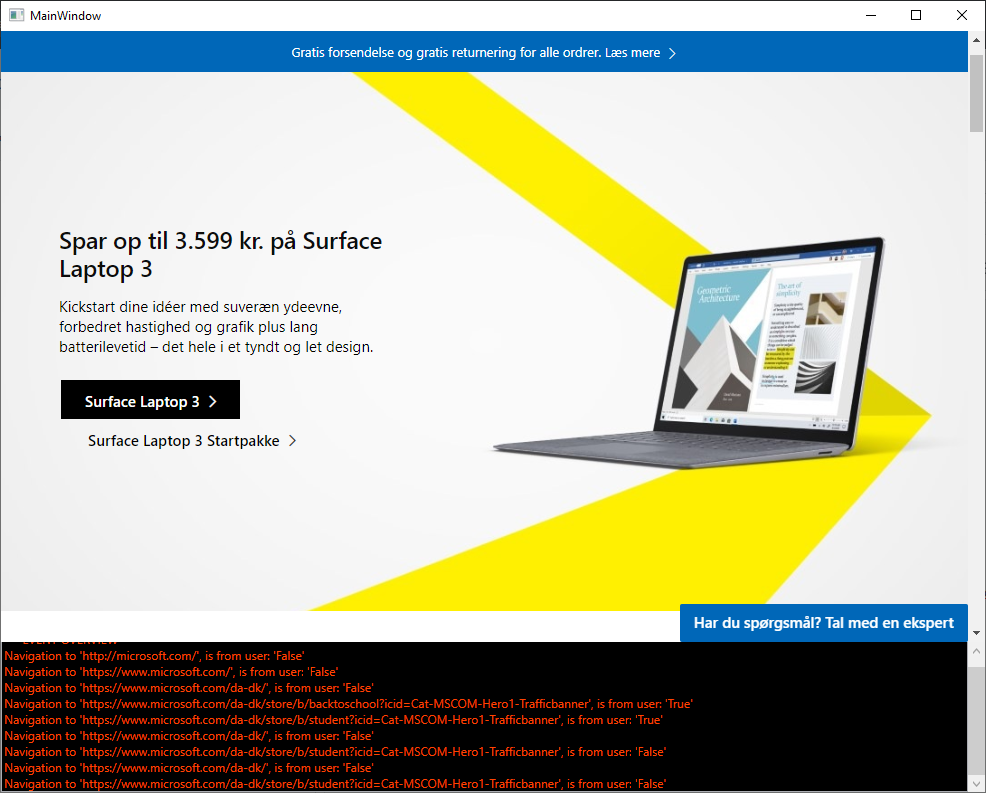
When a user navigates inside the browser we can subscribe to the NavigationStarted event which holds the property IsUserInitiated. When the user moves forwards/backwards in th browser this property is expected to be true, but this is not the case.
Code
I have created a minimum viable example which can reproduce the issue. Create a new WPF app with the following code:
MainWindow.xaml
<Window x:Class="TestWebView2App.MainWindow"
        xmlns="http://schemas.microsoft.com/winfx/2006/xaml/presentation"
        xmlns:d="http://schemas.microsoft.com/expression/blend/2008"
        xmlns:x="http://schemas.microsoft.com/winfx/2006/xaml"
        xmlns:mc="http://schemas.openxmlformats.org/markup-compatibility/2006"
        xmlns:wv2="clr-namespace:Microsoft.Web.WebView2.Wpf;assembly=Microsoft.Web.WebView2.Wpf"
        mc:Ignorable="d"
        Title="MainWindow" Height="800" Width="1000">

  <Grid>
    <Grid.RowDefinitions>
      <RowDefinition Height="*" />
      <RowDefinition Height="Auto" />
    </Grid.RowDefinitions>

    <wv2:WebView2 Name="WebView"
                  Source="http://microsoft.com" />

    <ScrollViewer Height="150"
                  Grid.Row="1">
      <TextBox x:Name="WebViewEvents"
               Text="*** EVENT OVERVIEW ***"
               Foreground="OrangeRed"
               Background="Black"
               IsReadOnly="True" />
    </ScrollViewer>

  </Grid>
</Window>
MainWindow.xaml.cs
using System;
using System.Windows;

namespace TestWebView2App
{
  public partial class MainWindow : Window
  {
    public MainWindow()
    {
      InitializeComponent();

      WebView.CoreWebView2Ready += WebView_CoreWebView2Ready;
    }

    private void WebView_CoreWebView2Ready(object sender, EventArgs e)
    {
      WebView.CoreWebView2.NavigationStarting += CoreWebView2_WebView_NavigationStarting;
    }

    private void CoreWebView2_WebView_NavigationStarting(object sender, Microsoft.Web.WebView2.Core.CoreWebView2NavigationStartingEventArgs e)
    {
      WebViewEvents.Text += Environment.NewLine + $"Navigation to '{e.Uri}', is from user: '{e.IsUserInitiated}'";
    }
  }
}
How to reproduce
- Open the app
- Press any link on the site
- Go back using either Alt+Left, a dedicated mouse button or the contextmenu
- Go forward again using the same measures
- See in the event overview that IsUserInitiated is not correctly reported
Contributor guide
No contributing guide indexed for this repository
First steps
- Read the whole issue, then the project's contributing guide.
- Comment on the issue to say you are picking it up — it saves two people doing the same work.
- Fork the repository and make your change on a branch.
- Open a pull request that references the issue number.
Research direction
Start with the supplied MainWindow.xaml and MainWindow.xaml.cs minimum example, run it using the listed WebView2 package, and observe NavigationStarting during link navigation and back/forward actions. Trace how CoreWebView2NavigationStartingEventArgs.IsUserInitiated is populated; done means the event reports the expected value for user-triggered backwards and forwards navigation.
Written by the indexing model from the issue text.
Assessment
- Tech stack
- csharp
- Domain
- desktop
- Issue type
- Bug
- Difficulty
- 4/5
- Estimated time
- 3-5 days
- Activity status
- Stale
- Clarity
- Mostly clear
- Newbie friendliness
- 42/100