MicrosoftEdge / MicrosoftEdge/WebView2Feedback
Text Search Popup captures focus to first window CTRL+F - WPF
@zhuhaichao518 is already working on this.
Since Apr 11, 2023.
- Dominant language
- PowerShell
- Stars
- 526
- Forks
- 67
- PR merge metrics
- No merged PRs in 30d
Description
Using tearable tabs feature from the dragablz library, the search text box will focus/bring to foreground the first window, even though I hit CTRL+F in the second window which has the WebView2. It happens if I first open the search box in WebView2 before tearing out the tab, then hit CTRL+F after tearing WebView2 out to a new window.
On the new window, when the text search popup appears it focuses and brings the first window to the top. Note I hit CTRL+F in the barely visible window below text search's X. The text search popup appears in the correct location, just with the wrong focus main window focus.
Note: If you drag the second window to another monitor, it doesn't focus the first window, but if you drag back to the same monitor, it does focus the first window again.
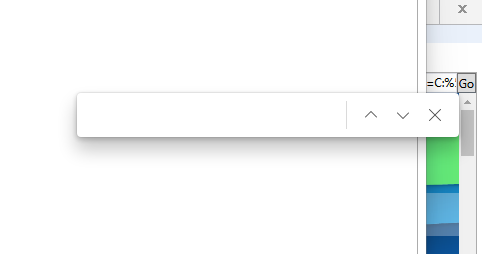
I was able to repeat this by adding the dragablz package to the WPF Sample project.
Add the package Dragablz https://www.nuget.org/packages/Dragablz
Add the name space to MainWindow.xaml.cs
xmlns:dragablz="http://dragablz.net/winfx/xaml/dragablz"
Wrap Lines 232 - 261 from wpf sample app with the following:
<dragablz:TabablzControl Margin="8">
    <dragablz:TabablzControl.InterTabController>
        <dragablz:InterTabController />
    </dragablz:TabablzControl.InterTabController>
    <TabItem Header="Tab No. 1" IsSelected="True">
        <DockPanel>
        <!--- PUT Lines 232-261 from WPF Sample APP HERE -->
        </DockPanel>
    </TabItem>
    <TabItem Header="Tab No. 2">
        <TextBlock>We Have Tearable Tabs! </TextBlock>
    </TabItem>
</dragablz:TabablzControl>
I also had to change the sample to build only net48, but that's more to do w/ my computer/environment.
Run the WPF sample and click to focus inside webview2, hit CTRL+F in the first window. Click and drag the tab so it tears off into a new window. Click inside webview2 to focus inside again, and hit CTRL+F and the first window is brought back to foreground with the text search box hovering over it.
Might be similar to https://github.com/MicrosoftEdge/WebView2Feedback/issues/3323
Contributor guide
No contributing guide indexed for this repository
First steps
- Read the whole issue, then the project's contributing guide.
- Comment on the issue to say you are picking it up — it saves two people doing the same work.
- Fork the repository and make your change on a branch.
- Open a pull request that references the issue number.
Assessment
This issue has not been assessed yet.