MicrosoftEdge / MicrosoftEdge/WebView2Feedback
Zoom addin SSO stops working after Webview2 Runtime is installed
@LiangTheDev is already working on this.
Since Jan 26, 2023.
- Dominant language
- PowerShell
- Stars
- 526
- Forks
- 67
- PR merge metrics
- No merged PRs in 30d
Description
Description
Task Pane Office Add-in doesn't load or SSO doesn't work after installing Microsoft Edge Webview2 Runtime.
We either get this on a loop, after clicking the SSO option and putting in the correct domain
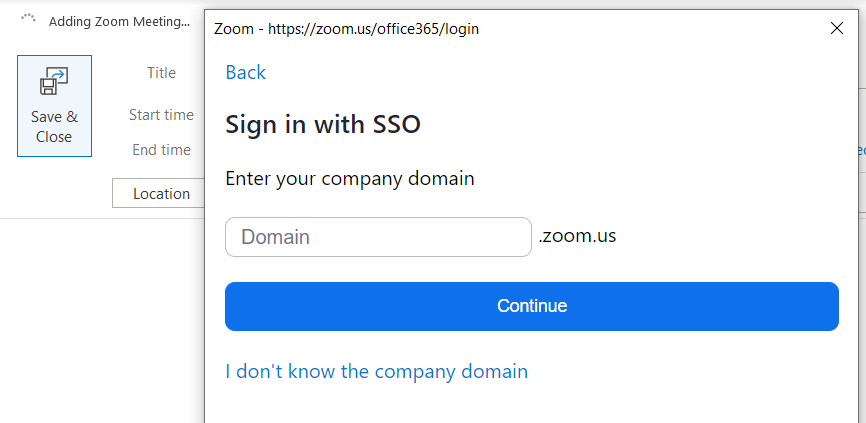
Or, after trying for a while, we get the following, even when having normal internet connectivity:
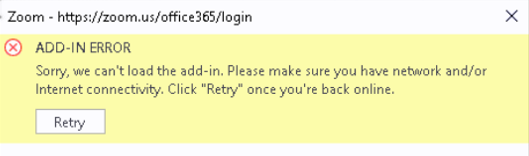
This has been tested in the office, behind a firewall, and using Wifi at home, without a Firewall.
Version
Version: 109.0.1518.61
OS: Win10 V 21H2
Repro Steps
Open the Settings panel from the Zoom addon on Outlook and try to sign in using SSO
Screenshots
Additional context
If we uninstall the Microsoft Edge Webview2 Runtime, authenticating via SSO works without issues, inside the office (firewall) and at home (without firewall).
Log from the Zoom plugin's Activity Log
Add a zoom meeting Log:
oneClickPrepareMeeting init
getOutlookPlatform: PC
isDesktopOutlook: true.
Enter oneClickPrepareMeeting ...
current zoomProgressStartTime is 0
Start Add Zoom meeting ...
Enter handlePrepareMeeting.
getOutlookPlatform: PC
start convert timezone
supportRecurrence is true.
start: Mon Jan 23 2023 11:15:00 GMT-0300 (Brasilia Standard Time)
end:Mon Jan 23 2023 11:30:00 GMT-0300 (Brasilia Standard Time)
call getRecurrence. false
getLocationWithTimeout, location:
inviteAttendee length:1
getOutlookPlatform: PC
optionalAttendee length:0
enhancedLocationAttendee length:0
handlePrepareMeeting Office.Promise.all then function
enter get meeting ID from body
handleScheduleMeeting start
Enter oneclickAddZmMeeting.
getUserSetting start.
getUserSetting promise.
getOutlookPlatform: PC
isDesktopOutlook: true.
get user setting call meeting
getOutlookPlatform: PC
get access token success
get token success
can get user email
prefer name is email
go to normal login page. auth error code: 10200
getUserSetting can't auto sign: 10200
showLoginWindow init.
getOutlookPlatform: PC
getOutlookPlatform: PC
showLoginWindow loginUrl: https://zoom.us/office365/login
displayDialogAsync result
start init local log flag:
getOutlookPlatform: PC
isDesktopOutlook: true.
login is desktop:
zakFail is: REDACTED, NOT SURE IF IT CAN BE PUBLICLY SHARED, WILL PROVIDE IF NECESSARY
login init vue.
login page init
this domain is: https://zoom.us/office365/login?_host_Info=Outlook$Win32$16.02$en-US$telemetry$isDialog$$0
mounted originDomain: B829B54F-BBD2-4734-METROSHARE-A55D-81E5889EE3A2
autoLoginFlag: true
isSameUser: REDACTED, NOT SURE IF IT CAN BE PUBLICLY SHARED, WILL PROVIDE IF NECESSARY
Enter loginDialogEventHandler.
Cannot load URL, no such page or bad URL syntax.
start init local log flag:
getOutlookPlatform: PC
isDesktopOutlook: true.
login is desktop:
zakFail is: REDACTED, NOT SURE IF IT CAN BE PUBLICLY SHARED, WILL PROVIDE IF NECESSARY
login init vue.
login page init
this domain is: https://zoom.us/office365/login?_host_Info=Outlook$Win32$16.02$en-US$telemetry$isDialog$$0
mounted originDomain: REDACTED, NOT SURE IF IT CAN BE PUBLICLY SHARED, WILL PROVIDE IF NECESSARY
autoLoginFlag: true
isSameUser: REDACTED, NOT SURE IF IT CAN BE PUBLICLY SHARED, WILL PROVIDE IF NECESSARY
Settings Log:
login initialize.
Contributor guide
No contributing guide indexed for this repository
First steps
- Read the whole issue, then the project's contributing guide.
- Comment on the issue to say you are picking it up — it saves two people doing the same work.
- Fork the repository and make your change on a branch.
- Open a pull request that references the issue number.
Assessment
This issue has not been assessed yet.