MicrosoftEdge / MicrosoftEdge/WebView2Feedback
Side-by-side 32 and 64bit fixed version, 64bit stops working if 32bit has been used once
@LiangTheDev is already working on this.
Since Aug 18, 2022.
- Dominant language
- PowerShell
- Stars
- 526
- Forks
- 67
- PR merge metrics
- No merged PRs in 30d
Description
Our app has both 32 and 64bit version, customer can decide which one to install (both is also possible).
We use fixed version of WebView2 Runtime (32 / 64, according to the App platorm), which is deployed together with the app.
So folder structure is like this:
32bit App, uses 32bit WebView2:
/program files(x86)
---/ourApp
------/Microsoft.WebView2.FixedVersionRuntime

64bit App, uses 64bit WebView2:
/program files
---/ourApp
------/Microsoft.WebView2.FixedVersionRuntime
If you start 64bit App first, you can use the (64bit) WebView2 in the App, works fine.
Close it, and start 32bit App. You can use the (32bit) WebView2 in the App, works fine.
Close it, and start 64bit App.
From now on, the 64bit WebView2 won't work anymore.
So it seems after starting 32bit App (which uses 32bit WebView2) the 64bit App's 64bit WebView2 just gives a gray background, does not load the page.
TaskMgr:
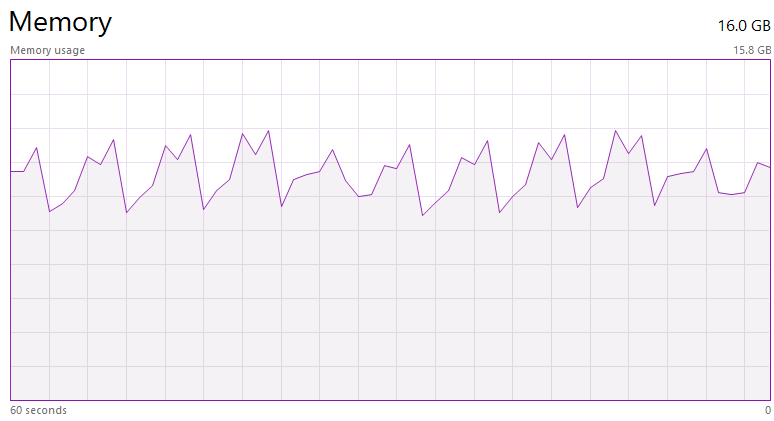
msedgewebview2.exe uses 100% cpu (1 core), and memory usage is increasing till ~6GB, then process closed, and another msedgewebview2.exe instance is started...forever...
Tried with
Microsoft.WebView2.FixedVersionRuntime.103.0.1264.77
Microsoft.WebView2.FixedVersionRuntime.104.0.1293.54
Microsoft.WebView2.FixedVersionRuntime.94.0.992.50
Same.
If I ever started the 32bit App (which uses 32bit fixed WebView2), the same version of the 64bit WebView2 won't work anymore.
Restarting computer does not solve the issue. So something is persisted when using the 32bit WebView2, which prevents the use later the 64bit WebView2 on that machine. The 32bit works fine however.
Contributor guide
No contributing guide indexed for this repository
First steps
- Read the whole issue, then the project's contributing guide.
- Comment on the issue to say you are picking it up — it saves two people doing the same work.
- Fork the repository and make your change on a branch.
- Open a pull request that references the issue number.
Assessment
This issue has not been assessed yet.