MicrosoftEdge / MicrosoftEdge/WebView2Feedback
custom CoreWebView2ContextMenuItem.Icon not show
Open
Nobody has claimed this yet.
bug
- Dominant language
- PowerShell
- Stars
- 526
- Forks
- 67
- PR merge metrics
- No merged PRs in 30d
Description
Description
 CoreWebView2ContextMenuItem newItem = edge.CoreWebView2.Environment.CreateContextMenuItem("复制链接", e.MenuItems.First().Icon, CoreWebView2ContextMenuItemKind.Command);
            newItem.CustomItemSelected += delegate (object send, Object ex)
            {
                Clipboard.SetText(edge.Source.ToString());
                edge.CoreWebView2.ExecuteScriptAsync("uni.showToast({  title: '复制成功',   duration: 2000}); ");
            };
             e.MenuItems.Add(newItem);
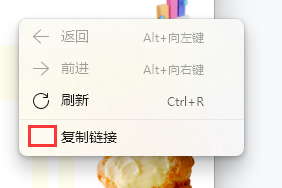
how can i do ...
Contributor guide
No contributing guide indexed for this repository
First steps
- Read the whole issue, then the project's contributing guide.
- Comment on the issue to say you are picking it up — it saves two people doing the same work.
- Fork the repository and make your change on a branch.
- Open a pull request that references the issue number.
Research direction
Start by reproducing the CoreWebView2ContextMenuItem.Icon behavior using the CreateContextMenuItem snippet in the issue. Check the WebView2 context-menu and icon API documentation to determine whether the supplied icon is expected to display; done means identifying a documented fix or limitation for the missing icon.
Written by the indexing model from the issue text.
Assessment
- Tech stack
- csharp
- Domain
- desktop
- Issue type
- Bug
- Difficulty
- 4/5
- Estimated time
- 3-5 days
- Activity status
- Stale
- Clarity
- Needs clarification
- Newbie friendliness
- 25/100