MicrosoftEdge / MicrosoftEdge/WebView2Feedback
Context Menu Item - Hotkey?
Open
@Lakshmisha-KS is already working on this.
Since Mar 3, 2025.
feature request
tracked
- Dominant language
- PowerShell
- Stars
- 526
- Forks
- 67
- PR merge metrics
- No merged PRs in 30d
Description
Take this code snippet:
// ALT + SHIFT + W
wil::com_ptr<ICoreWebView2ContextMenuItem> itemOpenFileLocation;
CHECK_FAILURE(webviewEnvironment->CreateContextMenuItem(
	L"Open File Location", nullptr,
	COREWEBVIEW2_CONTEXT_MENU_ITEM_KIND_COMMAND, &itemOpenFileLocation));

CHECK_FAILURE(itemOpenFileLocation->add_CustomItemSelected(
	Callback<ICoreWebView2CustomItemSelectedEventHandler>(
		[appWindow = this, target](ICoreWebView2ContextMenuItem* sender, IUnknown* args)
		{
			appWindow->GetParentWindow()->SendMessage(WM_COMMAND, ID_DISPLAY_WORKING_FOLDER, NULL);

			return S_OK;
		})
	.Get(),
			nullptr));
CHECK_FAILURE(items->InsertValueAtIndex(itemsCount, itemOpenFileLocation.get()));
itemsCount++;
It functions and the menu item is visible / operational:
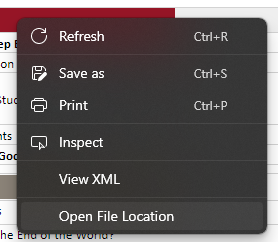
But, how do I insert the HOTKEY ALT + SHIFT + W over on the right? I tried:
L"Open File Location\tALT + SHIFT + W"
And it did not work.
Contributor guide
No contributing guide indexed for this repository
First steps
- Read the whole issue, then the project's contributing guide.
- Comment on the issue to say you are picking it up — it saves two people doing the same work.
- Fork the repository and make your change on a branch.
- Open a pull request that references the issue number.
Assessment
This issue has not been assessed yet.