MicrosoftEdge / MicrosoftEdge/WebView2Feedback
Non-Admin Installer Presents Modal Dialog when already installed
Nobody has claimed this yet.
- Dominant language
- PowerShell
- Stars
- 526
- Forks
- 67
- PR merge metrics
- No merged PRs in 30d
Description
With the new installer that doesn't require admin rights it looks there's a behavior change over running the installer with admin rights.
If the runtime is already installed, I get the following error message:
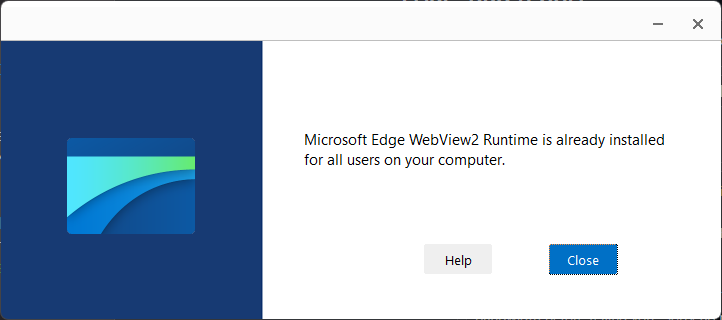
This may very well be for either the pre-installed Win11 WV2 runtime, or a previous Admin installation, but the error message is kind of useless since the runtime is in fact already installed.
Furthermore, it looks like the installer is downloading the installer before it presents this error. IOW, it wastes a bunch of time and bandwidth before telling you "Sorry no need..." which seems silly 😄
Oddly, this occurs only when installing in user mode. When running under Admin, that dialog is not shown. It also appears the runtime is not downloading first as the admin installer runs much quicker and without the progress bar running for a while.
Expected behavior
If the latest runtime is already installed the installer, should first check if already installed and if so should just exit (as the old one did) because in effect the job is done. The runtime is installed. We don't need a dialog that says it didn't install, when in fact the runtime is there.
If the runtime is not installed then it should go through the whole process of downloading and installation of course.
Other
This behavior breaks existing usage. Up until this point I've been firing up the WebView installer from my install on every install and letting it do the work of figuring out whether to install or not. But with the dialog this breaks the flow as now ever re-install will present the dialog.
Related Issue
I've had many problems Silent installation and have been unable to use this:
MicrosoftEdgeWebview2Setup.exe /silent /install
I'm using Inno and run the above as a post install [Run] commend, and when using Silent validations for both WinGet and Chocolatey fail. Not sure why exactly, but running non-silent works while silent appears to hang the installer. (running Admin install). In the relation to the issue above, I've not been able to run in /silent mode. As best as I can tell, the Package testing tools don't detect the exit code (or execution completion) from `/silent' mode correctly.
Summary Recommendations
-
Remove the Already Installed Dialog
This is a useless error message that doesn't help the user installing in any way. -
Synchronize behavior between Non-Admin and Admin Installs
I would expect the same behavior for the installer regardless of whether admin or non-admin modes are used. -
/Silent Mode Behavior Differences (other than no UI)
Contributor guide
No contributing guide indexed for this repository
First steps
- Read the whole issue, then the project's contributing guide.
- Comment on the issue to say you are picking it up — it saves two people doing the same work.
- Fork the repository and make your change on a branch.
- Open a pull request that references the issue number.
Research direction
Start by reproducing a user-mode installation with the WebView2 runtime already present, then compare its download and dialog behavior with an admin installation. Check the /silent /install path separately using the reported Inno, WinGet, or Chocolatey scenario; done means an existing runtime is detected before download and the relevant installation modes complete consistently.
Written by the indexing model from the issue text.
Assessment
- Domain
- cli, operating-systems, tooling
- Issue type
- Bug
- Difficulty
- 4/5
- Estimated time
- 3-5 days
- Activity status
- Stale
- Clarity
- Mostly clear
- Newbie friendliness
- 35/100