MicrosoftEdge / MicrosoftEdge/WebView2Feedback
setTimeout Issues in WebView2
Nobody has claimed this yet.
- Dominant language
- PowerShell
- Stars
- 526
- Forks
- 67
- PR merge metrics
- No merged PRs in 30d
Description
I'm back at trying to get the bloody Alt-key Menu forwarding to work in WPF after I thought I had that working, it keeps giving me problems.
Scenario:
The problem I'm solving with the code below is to handle Alt key forwarding to the WPF host app so the menu Alt key processing works - ie. alt key activates the menu and then further keystrokes navigate the menu. The problem is that the WebView - unlike the WebBrowser Control - doesn't handle this key forwarding automatically. I've set up code in JavaScript to intercept the Alt key, check for a delay between keys and then change focus from the WV to the WPF host and simulate the alt key press. It sort of works - but there's a problem with the event handling in the control it appears.
The following capture demonstrates the funky behavior.
Basically I handle the keyDown event, then set a marker to let me know the alt key was pressed, then setTimeout() to delay a 300 milliseonds to check if another key was pressed in between. If not I forward the key to .NET and the WPF host. The logic is fine it works - but not consistently.
The problem is that setTimeout() does not fire many times - until I perform some other UI action - another keypress or a mouse click.
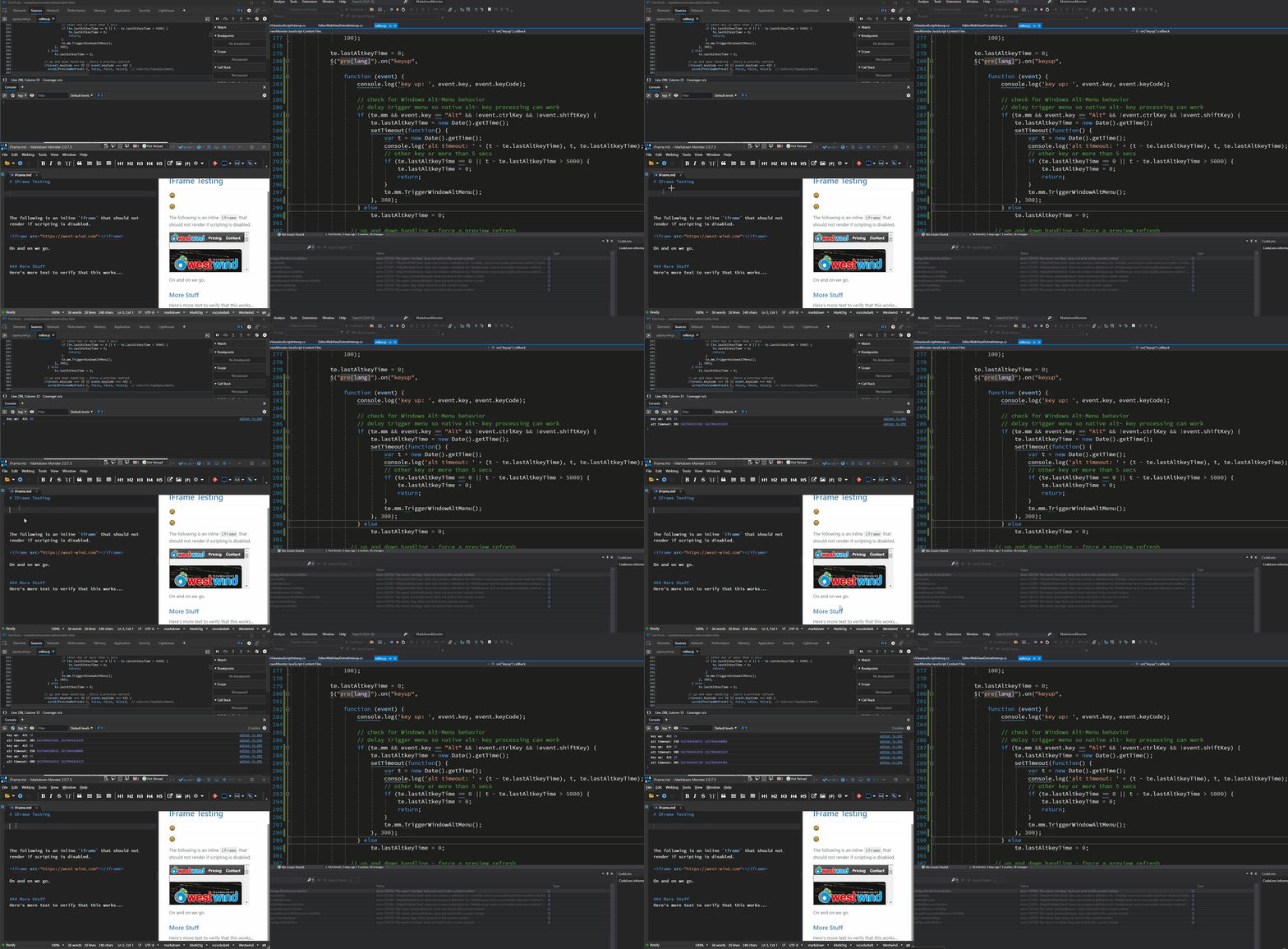
In the capture I start by focusing in my editor, then pressing alt. You can see the key handler trigger, and the alt key being active. However, note that the second console.log (in the setTimeout() does not trigger) - until I move the mouse and click or type another key.
Then after I've actually activated the menu at least once it sometimes works fine. The last couple of times you can see pressing alt and all the events fire - including the setTimeout() code - and the menu activates. It's still not consistent - at other times (when focus goes away from the editor then back into it it goes back to not firing).
I double checked my code in the rest of the function and commented out any other code that fires into .NET/WPF so there's nothing blocking on the Interop end from my application - the key is passed through like any other key otherwise.
Yet for some reason the setTimeout() call is blocked until some sort of UI interaction occurs which seems very wrong and likely attributable to the hosting scenario.
To clarify here's the code:
$("pre[lang]").on("keyup",
function (event) {
                    // this always fires
                    console.log('key up: ', event.key, event.keyCode);

                    // check for Windows Alt-Menu behavior
                    // delay trigger menu so native alt- key processing can work
                    if (te.mm && event.key == "Alt" && !event.ctrlKey && !event.shiftKey) {
                        te.lastAltkeyTime = new Date().getTime();

                        // this is the block in question - doesn't always fire after timeout
                        setTimeout(function() {
                            var t = new Date().getTime();

                            // this doesn't show up
                            console.log('alt timeout: ' + (t - te.lastAltkeyTime), t, te.lastAltkeyTime);

                            // other key or more than 5 secs
                            if (te.lastAltkeyTime == 0 || t - te.lastAltkeyTime > 5000) {
                                te.lastAltkeyTime = 0;
                                return;
                            }

                            // calls into WPF to activate the menu - it works but doesn't get called consistently now
                            te.mm.TriggerWindowAltMenu();
                        }, 300);


                    } else
                        te.lastAltkeyTime = 0;
...
// nothing blocking or WPF calls in the rest of the code
});

This feels like a typical 'DoEvents()` type operation that's stuck waiting for some other event that never happens.

Any ideas what would cause this and has this been seen before?

ps.

I will harp on this again: Please fix this alt-menu handling key forwarding in the control and don't make developers go through all the crap I'm going through to make this basic feature sort of work. It's insanely difficult to make this work at all and I still don't have it working correctly and this is something that is necessary for any serious application that wants to integrate in a polished Windows app.


[AB#35069995](https://microsoft.visualstudio.com/90b2a23c-cab8-4e7c-90e7-a977f32c1f5d/_workitems/edit/35069995)
Contributor guide
No contributing guide indexed for this repository
First steps
- Read the whole issue, then the project's contributing guide.
- Comment on the issue to say you are picking it up — it saves two people doing the same work.
- Fork the repository and make your change on a branch.
- Open a pull request that references the issue number.
Research direction
Start with the JavaScript keyup handler and its setTimeout call, then investigate how WebView2 event processing interacts with the WPF host and Alt-key forwarding. Reproduce the delayed callback using the provided scenario and confirm that the timeout fires without requiring another keypress or mouse action.
Written by the indexing model from the issue text.
Assessment
- Tech stack
- javascript
- Domain
- desktop
- Issue type
- Bug
- Difficulty
- 4/5
- Estimated time
- 3-5 days
- Activity status
- Stale
- Clarity
- Mostly clear
- Newbie friendliness
- 25/100