MicrosoftEdge / MicrosoftEdge/WebView2Feedback
WebView dynamically added to a control lingers after ShowDialog
Nobody has claimed this yet.
- Dominant language
- PowerShell
- Stars
- 526
- Forks
- 67
- PR merge metrics
- No merged PRs in 30d
Description
Description
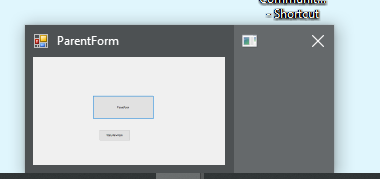
After closing a modal dialog on a form with a panel containing a WebView2 control, WebView2 lingers. It continues to render at the corner of the screen despite having Visible set to false.
Version
SDK: 1.0.774.44
Runtime: Microsoft Edge Version 89.0.774.63 (Official build) (64-bit)
Framework: WinForms
OS: Win10 Version 1803 (OS Build 17134.2090)
Repro Steps
- Create a form with a panel
- In the form's constructor, create a WebView2 object and add it to the panel. Set Dock property to DockStyle.Fill;
- Initialize the WebView2 object (EnsureCoreWebView2Async), optionally set Source via the panel
- Example Panel form:
 private readonly WebView2 webView;

 public PanelForm()
      {
         InitializeComponent();

         webView = new WebView2();
         webView.Dock = DockStyle.Fill;

         panel1.Controls.Add(webView);

         webView.EnsureCoreWebView2Async().ContinueWith((Task) => {
            panel1.Invoke(new Action(() => {
               webView.Source = new Uri("http://asdf.com");
            }));
         });
      }
- Create a form with a button to create the above form, and call ShowDialog on it. Set this to be the entry point of the test app
- Start the app, click the button to launch WebView2 in a modal window
- Close the window
Expected: WebView2 is hidden
Actual: WebView2 'pops out' of the panel, docked at the top left corner of the screen, and continues to render. It even has its own window, which looks like it's the Chrome_RenderWidgetHostHWND (WinSpy++)
Screenshots
Video of issue
https://user-images.githubusercontent.com/2666540/113195862-a5e3b980-9217-11eb-8ebf-fadde0214b0f.mp4
Additional context
I have a semi-working workaround.. After ShowDialog, I set the Visible property to false, and then call SetBounds(0,0,0,0) to hide the webview:
         var panelForm = new PanelForm();
         panelForm.ShowDialog();

         var test = panelForm.webView;
         test.Visible = false;
         test.SetBounds(0, 0, 0, 0);
But this still results in the Chrome rendering window hanging around:
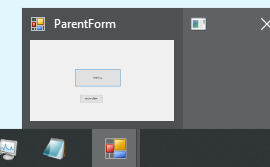
Other workaround is for me to dispose of the webview2 object entirely, but I'm trying to avoid that so I can use the same webview2 instance.
Contributor guide
No contributing guide indexed for this repository
First steps
- Read the whole issue, then the project's contributing guide.
- Comment on the issue to say you are picking it up — it saves two people doing the same work.
- Fork the repository and make your change on a branch.
- Open a pull request that references the issue number.
Research direction
Start with the WinForms reproduction: create the panel and WebView2 in the form constructor, call EnsureCoreWebView2Async, then open and close the form with ShowDialog. Compare the lingering rendering window with the Visible, SetBounds, and disposal workarounds; done means closing the dialog leaves no visible WebView2 or rendering child window while preserving the reusable instance.
Written by the indexing model from the issue text.
Assessment
- Tech stack
- csharp
- Domain
- desktop
- Issue type
- Bug
- Difficulty
- 4/5
- Estimated time
- 3-5 days
- Activity status
- Stale
- Clarity
- Mostly clear
- Newbie friendliness
- 35/100