MetaMask / MetaMask/metamask-extension
Confirmation State for Hardware Wallet Signing
Open
@flexa-rob is already working on this.
Since Feb 7, 2023.
- #17786 by @flexa-rob — closed without merging
area-hardware
external-contributor
INVALID-ISSUE-TEMPLATE
team-accounts-framework
team-extension-platform
- Dominant language
- TypeScript
- Stars
- 13.2k
- Forks
- 5.6k
- Avg merge
- 2d 5h
- Merged PRs (30d)
- 451
Description
Description of the feature
Feature would entail:
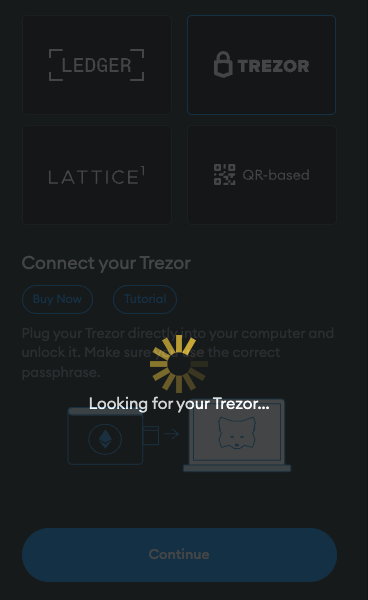
- Similar to how there's a loading screen when connecting a wallet, the idea would be to add a loading spinner when someone confirms a transaction/signing in the Metamask popup - after the "Confirm" button is clicked
- This would apply to signing of transactions, messages and typed data, therefore these components would have to contain the functionality:
SignatureRequestOriginalSignatureRequest- and
ConfirmTransactionBase
- Therefore, it may be logical to implement the functionality upstream in
ConfirmTransaction-confirm-transaction.component.js
- This would apply to signing of transactions, messages and typed data, therefore these components would have to contain the functionality:
- Loading spinner would persist until hardware wallet transaction is either confirmed or rejected
- Spinner would prevent cycling through the transaction queue until the spinner goes away (either via user rejection or approval)
Reasons for the feature:
- Facilitates MV3 Hardware wallet changes as we can persist the client until the transaction is finished
- There are some user stories that benefit from a loading screen:
- E.g., immediately directs user's attention to confirm the transaction/signing on their device. A new hardware wallet user would intuitively think that the transaction is finished when they hit "Confirm", esp. if this user is used to using hard-disk wallets
- E.g., there are some situations where the app may appear broken if there's a pending transaction to be signed on the wallet - especially relevant to Ledgers
Contributor guide
First steps
- Read the whole issue, then the project's contributing guide.
- Comment on the issue to say you are picking it up — it saves two people doing the same work.
- Fork the repository and make your change on a branch.
- Open a pull request that references the issue number.
Assessment
This issue has not been assessed yet.