MaterialDesignInXAML / MaterialDesignInXAML/MaterialDesignInXamlToolkit
Validation rule is not fired when control is loaded with binding
Nobody has claimed this yet.
- Dominant language
- C#
- Stars
- 16.3k
- Forks
- 3.5k
- Avg merge
- 1d 22h
- Merged PRs (30d)
- 8
Description
### Bug explanation
when a userControl is added with xaml directly, the validation rules used inside the UC works just fine, but when the same UC is loaded via binding of view model, the validation does not work. Here is an screenshot
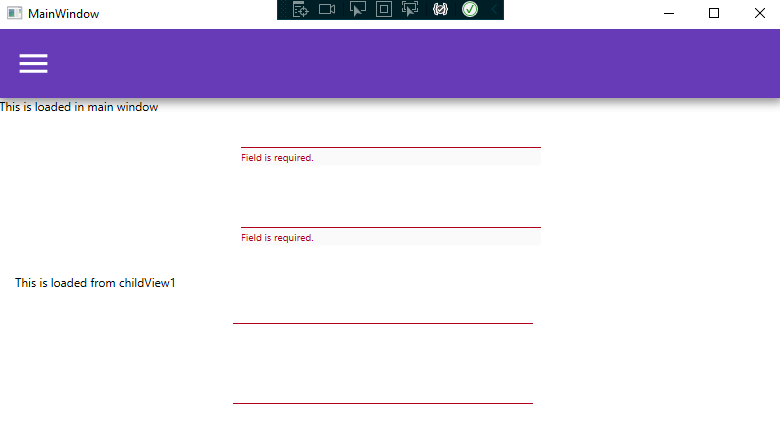
and here is a demo project reproducing the problem: [repo](https://github.com/aliBordbar1992/WpfValidationProblem)
I struggled a lot with this but just couldn't find a way to fix this. Also I don't know if this is something wrong with my code, or it is really a bug.
### Version
4.5.0
Contributor guide
First steps
- Read the whole issue, then the project's contributing guide.
- Comment on the issue to say you are picking it up — it saves two people doing the same work.
- Fork the repository and make your change on a branch.
- Open a pull request that references the issue number.
Research direction
Start with the linked demo project, WpfValidationProblem, and reproduce the difference between adding the user control directly in XAML and loading it through view-model binding. Compare the two loading paths to identify why the validation rule is not fired, then verify that validation works in both cases on the reported 4.5.0 setup.
Written by the indexing model from the issue text.
Assessment
- Tech stack
- csharp
- Domain
- desktop
- Issue type
- Bug
- Difficulty
- 4/5
- Estimated time
- 3-5 days
- Activity status
- Stale
- Clarity
- Needs clarification
- Newbie friendliness
- 35/100