MarketSquare / MarketSquare/robotframework-SikuliLibrary
Stalled Java Process After calling the Stop Remote Server
Nobody has claimed this yet.
- Dominant language
- Java
- Stars
- 163
- Forks
- 60
- PR merge metrics
- No merged PRs in 30d
Description
Hi,
I call `stop remote server` keyword in suite teardown and I can see the stalled Java.exe process in task manager.
Following are the steps used in my test case
Start Sikuli Process
Click on the Image
In suite tear down I call stop remote server
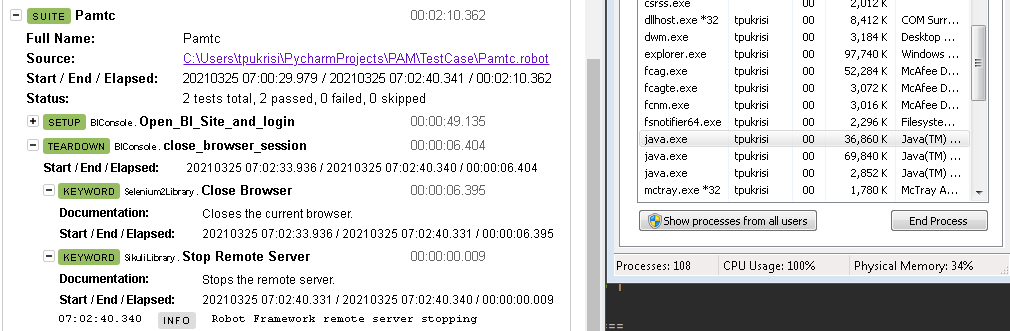
Please advice me how to close the server and Java process
Thanks
Krishna
Contributor guide
No contributing guide indexed for this repository
First steps
- Read the whole issue, then the project's contributing guide.
- Comment on the issue to say you are picking it up — it saves two people doing the same work.
- Fork the repository and make your change on a branch.
- Open a pull request that references the issue number.
Research direction
Start with the `stop remote server` keyword used in the suite teardown and reproduce the Sikuli test flow on Windows while observing the Java.exe process. Done means the remote server and its Java process exit cleanly after teardown; the issue does not name a source file or test to run.
Written by the indexing model from the issue text.
Assessment
- Tech stack
- java
- Domain
- desktop, testing
- Issue type
- Bug
- Difficulty
- 4/5
- Estimated time
- 3-5 days
- Activity status
- Stale
- Clarity
- Needs clarification
- Newbie friendliness
- 25/100