ManimCommunity / ManimCommunity/manim
Text string displayed incorrect after render
Nobody has claimed this yet.
- Dominant language
- Python
- Stars
- 40.9k
- Forks
- 3.1k
- Avg merge
- 3d 12h
- Merged PRs (30d)
- 25
Description
Hi,
I'm using manim on Ubuntu 18.04 with the Python 3.9.12 installed.
This is the `manim --version` output : Manim Community v0.16.0.post0
I'm trying to Write : "XOR" and display it.
However, it is displaying **OXR** instead of XOR
**Code**:
```python
from manim import *
class LogicGates(Scene):
UP_COORDINATE = 2.5
BOTTOM_COORDINATE = -2.5
def construct(self):
# XOR
xor_uparc = ArcBetweenPoints(start = [-1,-1,0], end = [1,0,0], angle = PI/4)
xor_lowarc = ArcBetweenPoints(start = [-1,1,0], end = [1,0,0], angle = -PI/4)
xor_leftarc = ArcBetweenPoints(start = [-1,1,0], end = [-1,-1,0], angle = -PI/3)
xor_leftarc2 = ArcBetweenPoints(start = [-1,1,0], end = [-1,-1,0], angle = -PI/3).shift(LEFT*0.2)
xor_text = Text("XOR").shift(DOWN*2)
XOR_gate = Group(xor_uparc, xor_lowarc, xor_leftarc, xor_leftarc2 ,xor_text)
self.play(Write(xor_text))
self.add(XOR_gate)
self.wait()
self.play(XOR_gate.animate.move_to([2,self.BOTTOM_COORDINATE,0]).scale(0.6).set_color(random_color()))
self.wait()
```
I've executed the above code using `manim -pql scene.py LogicGates`
Logs are as follows:
```
(base) alisvndk@alisvndk:~/Desktop/manim_playground$ manim -pql scene.py LogicGates
Manim Community v0.16.0.post0
[11/26/22 10:36:25] INFO Animation 0 : Using cached data (hash : 3163782288_586402695_223132457) cairo_renderer.py:75
INFO Animation 1 : Using cached data (hash : 2201830969_329969645_4216184406) cairo_renderer.py:75
INFO Animation 2 : Using cached data (hash : 2201830969_4037336760_2974180473) cairo_renderer.py:75
INFO Animation 3 : Using cached data (hash : 2201830969_329969645_2160032255) cairo_renderer.py:75
INFO Combining to Movie file. scene_file_writer.py:607
INFO scene_file_writer.py:728
File ready at
'/home/alisvndk/Desktop/manim_playground/media/videos/scene/480p15/LogicGates.mp4'
INFO Rendered LogicGates scene.py:240
Played 4 animations
INFO Previewed File at: file_ops.py:224
'/home/alisvndk/Desktop/manim_playground/media/videos/scene/480p15/LogicGates.mp4'
```
Here is the screenshot
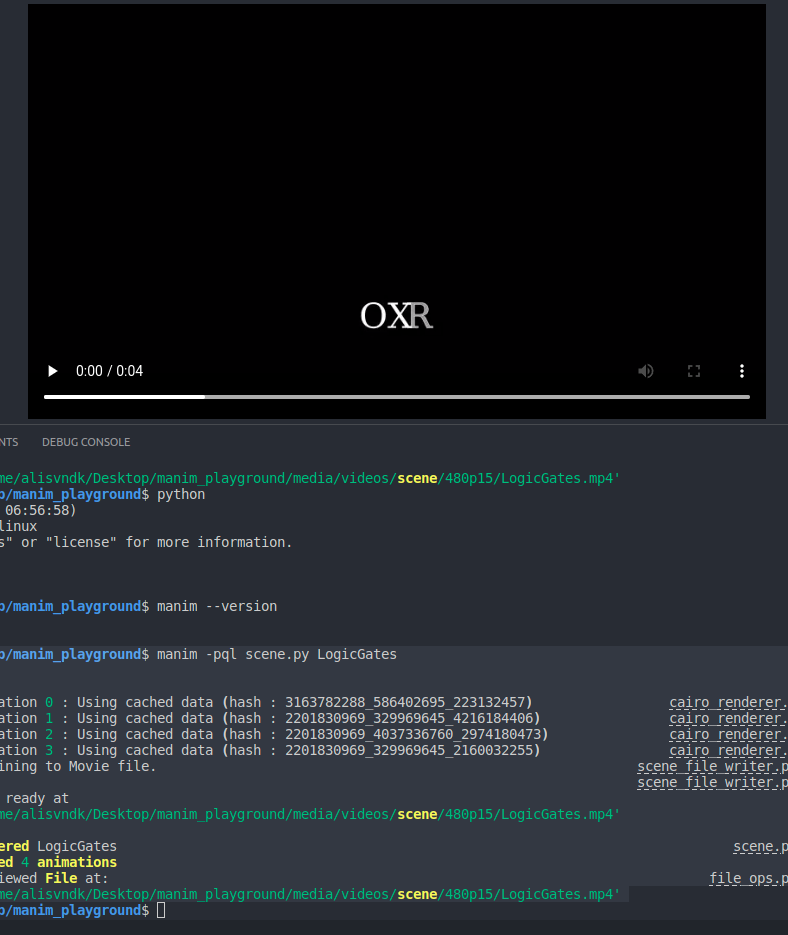
Video:
https://user-images.githubusercontent.com/25587073/204473901-55a7a8f1-a292-4855-b61a-9f7161db69d8.mp4
I wonder, If I miss something ?
I think this is not the only text error, I'm having this kind of problems on another texts as well.
Contributor guide
First steps
- Read the whole issue, then the project's contributing guide.
- Comment on the issue to say you are picking it up — it saves two people doing the same work.
- Fork the repository and make your change on a branch.
- Open a pull request that references the issue number.
Research direction
Reproduce the supplied LogicGates scene on Ubuntu with Manim v0.16.0.post0, focusing first on Text("XOR") and Write(xor_text). Compare the rendered output with the source order and check whether the same problem affects the other reported text cases. Done means text renders in the authored order.
Written by the indexing model from the issue text.
Assessment
- Tech stack
- python
- Domain
- computer-graphics
- Issue type
- Bug
- Difficulty
- 3/5
- Estimated time
- 1-2 days
- Activity status
- Stale
- Clarity
- Mostly clear
- Newbie friendliness
- 42/100