ManimCommunity / ManimCommunity/manim
Weird artifacts / glitches for `renderer=opengl`
Nobody has claimed this yet.
- Dominant language
- Python
- Stars
- 40.9k
- Forks
- 3.1k
- Avg merge
- 3d 12h
- Merged PRs (30d)
- 25
Description
## Description of bug / unexpected behavior
When working with `renderer=opengl` I often get some weird artifacts in the video. The example below is just some easy example, it gets worse for complex examples. They come in black lines/boxes. Here are three screenshots from a video:


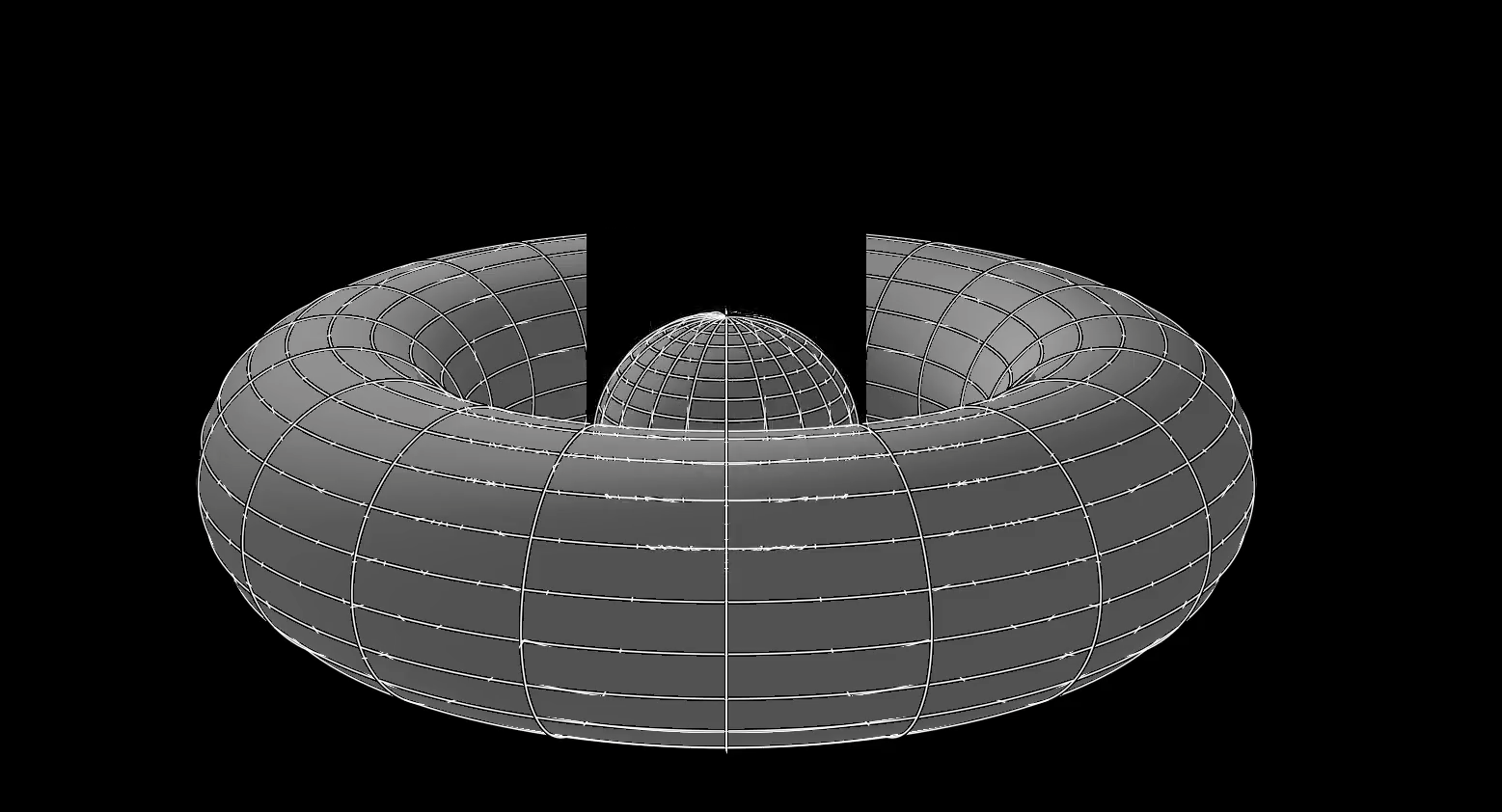
## Expected behavior
Well, I wouldn't expect those glitches.
## How to reproduce the issue
Run with
`manim -qh --renderer=opengl --write_to_movie opengl.py Test`
```py
class Test(Scene):
def construct(self):
frame = self.renderer.camera
frame.set_euler_angles(
phi=75 * DEGREES,
)
sphere = OpenGLSphere(
radius=1,
resolution=(101, 101)
).shift(OUT)
torus = OpenGLTorus(r1=1, r2=1)
torus2 = OpenGLTorus(r1=3, r2=1).shift(IN)
s_mesh = OpenGLSurfaceMesh(
sphere
)
t_mesh = OpenGLSurfaceMesh(
torus
)
t2_mesh = OpenGLSurfaceMesh(
torus2
)
self.play(
Create(s_mesh),
FadeIn(sphere),
Create(t2_mesh),
FadeIn(torus2)
)
self.wait()
self.play(
sphere.animate.shift(IN*2),
s_mesh.animate.shift(IN*2)
)
self.wait()
self.play(
ReplacementTransform(s_mesh, t2_mesh),
ReplacementTransform(sphere, torus2)
)
self.wait()
self.play(
ReplacementTransform(t2_mesh, t_mesh),
ReplacementTransform(torus2, torus)
)
self.wait()
```
## Additional media files
https://user-images.githubusercontent.com/44864613/124495576-921c9600-ddb8-11eb-8b8c-2050b318e32a.mp4
https://user-images.githubusercontent.com/44864613/124496699-102d6c80-ddba-11eb-9525-d2dd0a91b410.mp4
## Logs
Terminal output
```
PASTE HERE OR PROVIDE LINK TO https://pastebin.com/ OR SIMILAR
```
## System specifications
- OS: macOS Big Sur 11.4
- RAM: 8GB
- Graphics Card: Intel Iris Plus Graphics 655 1536 MB
- Python version: 3.9.6
Contributor guide
First steps
- Read the whole issue, then the project's contributing guide.
- Comment on the issue to say you are picking it up — it saves two people doing the same work.
- Fork the repository and make your change on a branch.
- Open a pull request that references the issue number.
Research direction
Start by running the supplied `manim -qh --renderer=opengl --write_to_movie opengl.py Test` command with the example in `opengl.py`, then compare the rendered video with the screenshots and media. Trace the OpenGL rendering path involved in the reproduced artifacts; the issue is resolved when the black lines and boxes no longer appear in the output.
Written by the indexing model from the issue text.
Assessment
- Tech stack
- python
- Domain
- computer-graphics
- Issue type
- Bug
- Difficulty
- 4/5
- Estimated time
- 3-5 days
- Activity status
- Stale
- Clarity
- Mostly clear
- Newbie friendliness
- 35/100