MahApps / MahApps/MahApps.Metro
Problem using HamburgerMenu together with WindowCommands and the SizeToContent property
Nobody has claimed this yet.
- Dominant language
- C#
- Stars
- 9.8k
- Forks
- 2.4k
- Avg merge
- 1h 2m
- Merged PRs (30d)
- 56
Description
**Describe the bug**
I have a window that should resize the height depending on the content. I also have a hamburger menu and some WindowCommands on the right side.
On startup the content of the hamburger menu is shifted and the menu is opened. I have to click the menu button twice to bring it back to the correct layout. This only happens when either a WindowCommand is preset or the SizeToContent property is set to anything that is not manual.
**To Reproduce**
```
Search
Settings
```
**Expected behavior**
The menu behaves the same regarding of existing WindowCommands or the SizeToContent property
**Screenshots**
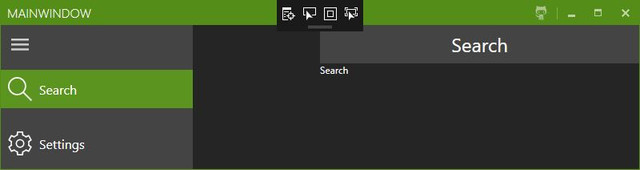
**Environment:**
- MahApps.Metro version v1.6.5
- OS: Win10 1809
- Visual Studio 2019 16.1.3
- .NET Framework 4.5
Contributor guide
First steps
- Read the whole issue, then the project's contributing guide.
- Comment on the issue to say you are picking it up — it saves two people doing the same work.
- Fork the repository and make your change on a branch.
- Open a pull request that references the issue number.
Research direction
Reproduce the startup layout using the provided MetroWindow XAML with SizeToContent="Height", HamburgerMenu, and RightWindowCommands. First isolate whether SizeToContent or WindowCommands triggers the shifted and initially opened menu, then verify the menu has the expected layout immediately and after one click.
Written by the indexing model from the issue text.
Assessment
- Tech stack
- csharp
- Domain
- desktop
- Issue type
- Bug
- Difficulty
- 4/5
- Estimated time
- 3-5 days
- Activity status
- Stale
- Clarity
- Mostly clear
- Newbie friendliness
- 35/100