MacDownApp / MacDownApp/macdown
customizable Touch Bar layout
Nobody has claimed this yet.
- Dominant language
- Rich Text Format
- Stars
- 9.8k
- Forks
- 1.2k
- PR merge metrics
- No merged PRs in 30d
Description
As #969 introduced a much simpler implementation for the Touch Bar, it would be nice to bring back the customization compatibility.
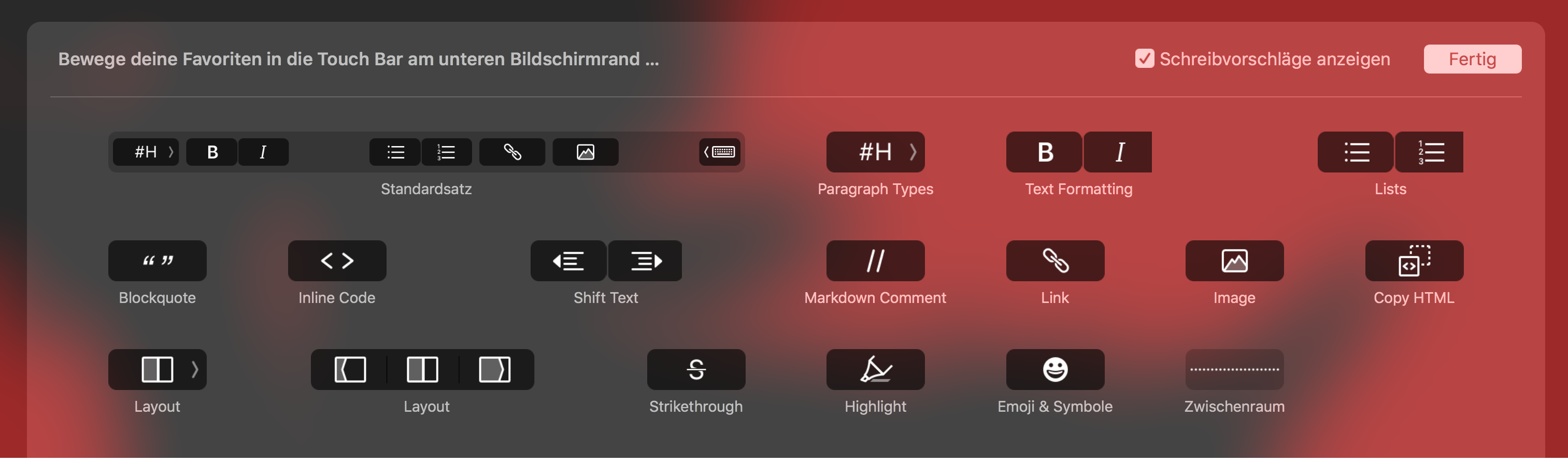
UX wise it would be better to make bigger buttons, create some button groups (segmented controls) and let the user customize the Touch Bar - as there are way to many buttons available and also some features only when enabled in the settings.
As also discussed in #714 I would recommend to make a default Touch Bar similar to this:

Customizable screen from the older/unused implementation from the `touchbar-support` branch:
Contributor guide
First steps
- Read the whole issue, then the project's contributing guide.
- Comment on the issue to say you are picking it up — it saves two people doing the same work.
- Fork the repository and make your change on a branch.
- Open a pull request that references the issue number.
Research direction
Start by reviewing the implementation introduced in #969 and the older `touchbar-support` branch, then read the related discussion in #714. Compare the current Touch Bar behavior with the supplied layouts and define the agreed scope for larger buttons, grouped controls, and user customization. Done should mean the compatibility behavior and default layout are implemented consistently with that design.
Written by the indexing model from the issue text.
Assessment
- Tech stack
- macos, objective-c
- Domain
- design, desktop
- Issue type
- Feature
- Difficulty
- 5/5
- Estimated time
- Over a week
- Activity status
- Stale
- Clarity
- Mostly clear
- Newbie friendliness
- 30/100