MacDownApp / MacDownApp/macdown
Save Prompt
Nobody has claimed this yet.
- Dominant language
- Rich Text Format
- Stars
- 9.8k
- Forks
- 1.2k
- PR merge metrics
- No merged PRs in 30d
Description
In the Big Sur beta 6, I encounter this prompt after every few minutes. Even after ensuring that the file is not open in any of the other apps, the prompt still pops up.
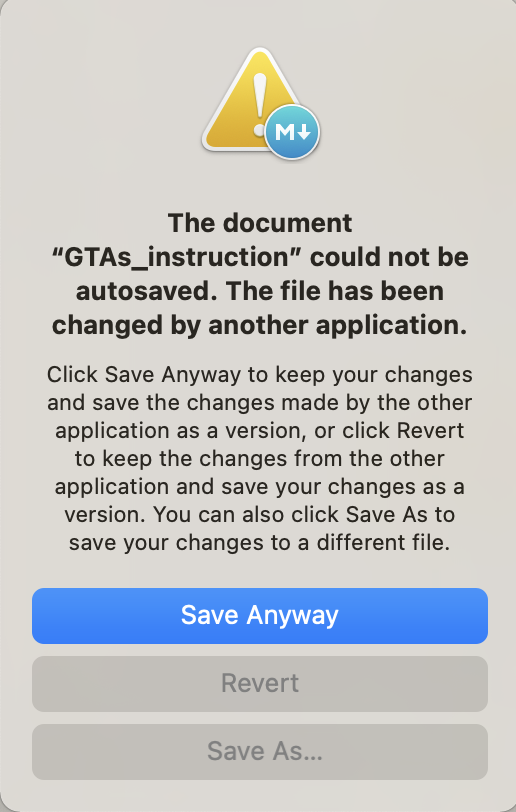
I installed Macdown via HomeBrew `brew install cask macdown` but ran the update to get to the version `0.7.3`. Just checked that Macdown is not present in the Apps list with Files and Folders access.
Contributor guide
First steps
- Read the whole issue, then the project's contributing guide.
- Comment on the issue to say you are picking it up — it saves two people doing the same work.
- Fork the repository and make your change on a branch.
- Open a pull request that references the issue number.
Research direction
No source file or test is identified in the issue. First reproduce the recurring save prompt on macOS Big Sur beta 6 with MacDown 0.7.3, using the Homebrew-installed app and a file that is not open elsewhere. Done means the prompt no longer appears repeatedly under those conditions, with the cause and a reproducible verification path documented.
Written by the indexing model from the issue text.
Assessment
- Tech stack
- macos
- Domain
- desktop
- Issue type
- Bug
- Difficulty
- 4/5
- Estimated time
- 3-5 days
- Activity status
- Stale
- Clarity
- Needs clarification
- Newbie friendliness
- 30/100