MacDownApp / MacDownApp/macdown
Toolbar: hidden buttons are listed in the overflow menu but are greyed out
Open
- Dominant language
- Rich Text Format
- Stars
- 9.8k
- Forks
- 1.2k
- PR merge metrics
- No merged PRs in 30d
Description
I looked but couldn't find an existing issue that covers this.
Screenshot:
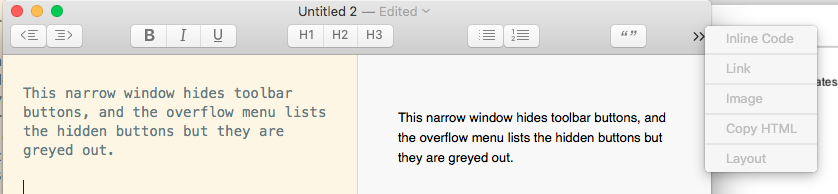
I expect that overflow menu to give me access to hidden toolbar buttons, like in MS Word and the Chrome browser.
I'm using 0.7.3 (1008.4) on macOS High Sierra (10.13.6).
Contributor guide
Research direction
Reproduce the toolbar overflow behavior described in the issue on macOS, then trace the toolbar and overflow-menu entry point. Confirm which hidden buttons are disabled and determine the change needed so the overflow menu activates them; done means hidden toolbar buttons can be selected from the menu.
Written by the indexing model from the issue text.
Assessment
- Tech stack
- macos, objective-c
- Domain
- desktop
- Issue type
- Bug
- Difficulty
- 3/5
- Estimated time
- 1-2 days
- Activity status
- Stale
- Clarity
- Mostly clear
- Newbie friendliness
- 38/100