Lightning-AI / Lightning-AI/pytorch-lightning
`TensorBoardLogger` does not save logs correctly on GCS
Nobody has claimed this yet.
- Dominant language
- Python
- Stars
- 31.4k
- Forks
- 3.8k
- Avg merge
- 6d 7h
- Merged PRs (30d)
- 6
Description
### Bug description
`TensorBoardLogger` records only one scalar when `save_dir` is a GCS URI (e.g., gs://path/to/logs/).
### How to reproduce the bug
```python
import os
import pytorch_lightning as pl
from pytorch_lightning.loggers import TensorBoardLogger
from torch import nn, optim, utils
from torchvision.datasets import MNIST
from torchvision.transforms import ToTensor
# define any number of nn.Modules (or use your current ones)
encoder = nn.Sequential(nn.Linear(28 * 28, 64), nn.ReLU(), nn.Linear(64, 3))
decoder = nn.Sequential(nn.Linear(3, 64), nn.ReLU(), nn.Linear(64, 28 * 28))
# define the LightningModule
class LitAutoEncoder(pl.LightningModule):
def __init__(self, encoder, decoder):
super().__init__()
self.encoder = encoder
self.decoder = decoder
def training_step(self, batch, batch_idx):
# training_step defines the train loop.
# it is independent of forward
x, y = batch
x = x.view(x.size(0), -1)
z = self.encoder(x)
x_hat = self.decoder(z)
loss = nn.functional.mse_loss(x_hat, x)
# Logging to TensorBoard (if installed) by default
self.log("train_loss", loss)
return loss
def configure_optimizers(self):
optimizer = optim.Adam(self.parameters(), lr=1e-3)
return optimizer
# init the autoencoder
autoencoder = LitAutoEncoder(encoder, decoder)
# setup data
dataset = MNIST(os.getcwd(), download=True, transform=ToTensor())
train_loader = utils.data.DataLoader(dataset)
# train the model (hint: here are some helpful Trainer arguments for rapid idea iteration)
# logger = TensorBoardLogger('.')
logger = TensorBoardLogger("gs://path/to/logs/")
trainer = pl.Trainer(limit_train_batches=100, max_epochs=1, logger=logger)
trainer.fit(model=autoencoder, train_dataloaders=train_loader)
```
### Error messages and logs
No explicit error messages. Instead, TensorBoard screenshots are attached below.
|Save to local|Save to GCS|
|:---:|:---:|
|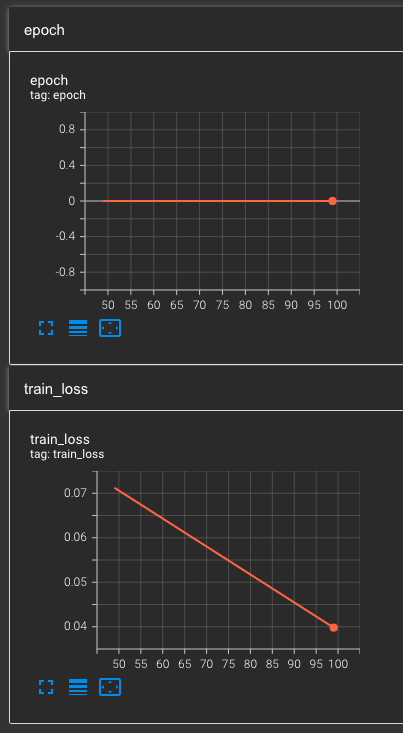|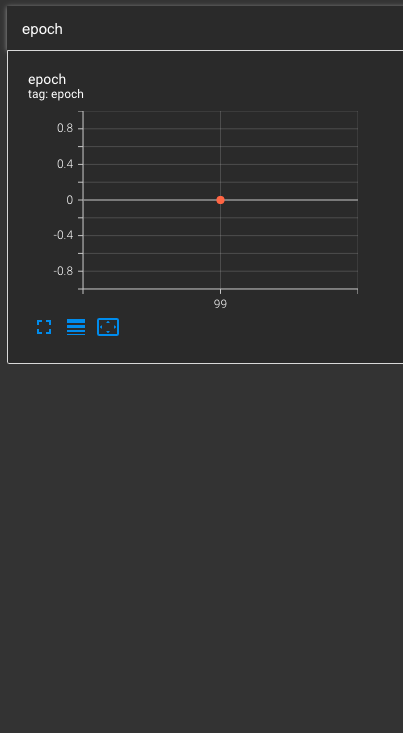|
### Environment
Current environment
```
* CUDA:
- GPU:
- Tesla T4
- available: True
- version: 11.7
* Lightning:
- lightning-utilities: 0.8.0
- pytorch-lightning: 1.9.4
- torch: 1.13.1
- torchmetrics: 0.11.4
- torchvision: 0.14.1
* Packages:
- absl-py: 1.4.0
- aiohttp: 3.8.4
- aiosignal: 1.3.1
- async-timeout: 4.0.2
- attrs: 22.2.0
- cachetools: 5.3.0
- certifi: 2022.12.7
- charset-normalizer: 3.1.0
- decorator: 5.1.1
- frozenlist: 1.3.3
- fsspec: 2023.3.0
- gcsfs: 2023.3.0
- google-api-core: 2.11.0
- google-auth: 2.16.2
- google-auth-oauthlib: 0.4.6
- google-cloud-core: 2.3.2
- google-cloud-storage: 2.7.0
- google-crc32c: 1.5.0
- google-resumable-media: 2.4.1
- googleapis-common-protos: 1.58.0
- grpcio: 1.51.3
- idna: 3.4
- lightning-utilities: 0.8.0
- markdown: 3.4.1
- markupsafe: 2.1.2
- multidict: 6.0.4
- numpy: 1.24.2
- nvidia-cublas-cu11: 11.10.3.66
- nvidia-cuda-nvrtc-cu11: 11.7.99
- nvidia-cuda-runtime-cu11: 11.7.99
- nvidia-cudnn-cu11: 8.5.0.96
- oauthlib: 3.2.2
- packaging: 23.0
- pillow: 9.4.0
- pip: 22.3.1
- protobuf: 4.22.1
- pyasn1: 0.4.8
- pyasn1-modules: 0.2.8
- pytorch-lightning: 1.9.4
- pyyaml: 6.0
- requests: 2.28.2
- requests-oauthlib: 1.3.1
- rsa: 4.9
- setuptools: 65.5.0
- six: 1.16.0
- tensorboard: 2.12.0
- tensorboard-data-server: 0.7.0
- tensorboard-plugin-wit: 1.8.1
- torch: 1.13.1
- torchmetrics: 0.11.4
- torchvision: 0.14.1
- tqdm: 4.65.0
- typing-extensions: 4.5.0
- urllib3: 1.26.15
- werkzeug: 2.2.3
- wheel: 0.38.4
- yarl: 1.8.2
* System:
- OS: Linux
- architecture:
- 64bit
- ELF
- processor: x86_64
- python: 3.10.9
- version: #34-Ubuntu SMP Fri Jan 6 01:03:08 UTC 2023
```
### More info
_No response_
cc @awaelchli
Contributor guide
First steps
- Read the whole issue, then the project's contributing guide.
- Comment on the issue to say you are picking it up — it saves two people doing the same work.
- Fork the repository and make your change on a branch.
- Open a pull request that references the issue number.
Research direction
Start with the TensorBoardLogger implementation and reproduce the reported example using a gs:// save_dir. Compare the local and GCS event outputs, then verify that multiple scalar records are preserved and visible in TensorBoard; no specific source file or test is named in the issue.
Written by the indexing model from the issue text.
Assessment
- Tech stack
- gcp, python, pytorch
- Domain
- cloud, observability
- Issue type
- Bug
- Difficulty
- 4/5
- Estimated time
- 3-5 days
- Activity status
- Stale
- Clarity
- Mostly clear
- Newbie friendliness
- 35/100