Lightning-AI / Lightning-AI/pytorch-lightning
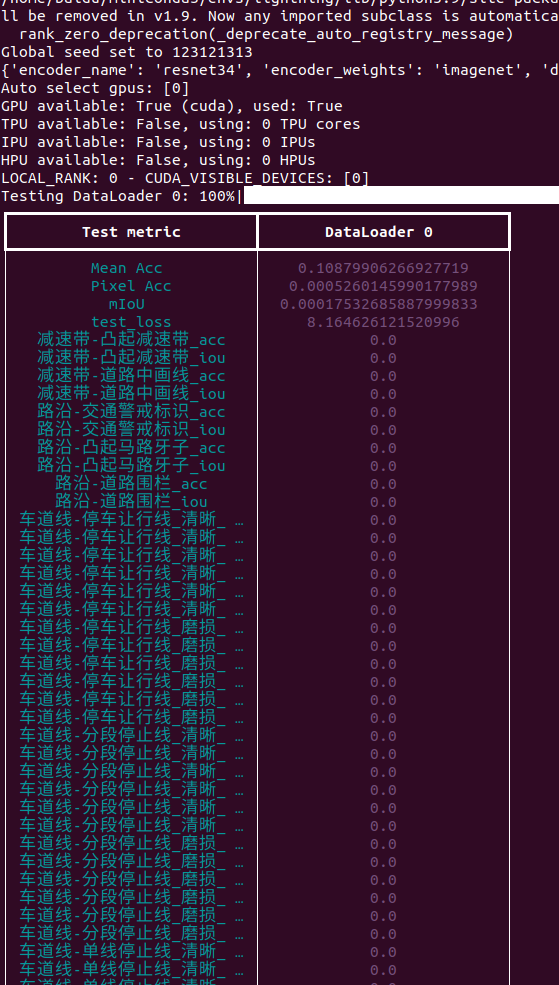
When test, the printed log does not show the full text of the metrics, when named in Chinese
@heng-yuwen is already working on this.
Since Sep 24, 2022.
- Dominant language
- Python
- Stars
- 31.4k
- Forks
- 3.8k
- Avg merge
- 6d 7h
- Merged PRs (30d)
- 6
Description
### First check
- [X] I'm sure this is a bug.
- [X] I've added a descriptive title to this bug.
- [X] I've provided clear instructions on how to reproduce the bug.
- [X] I've added a code sample.
- [x] I've provided any other important info that is required.
### Bug description
Hi,
I am dealing with a very messy segmentation problem, which requires me to log the per-category accuracy and iou at test time. I used self.log(category, metrics) to do this job at "on_test_epoch_end". However, the log does not show the full metrics text, and shorten rest of it to "..." instead, when the metric name is in Chinese. I know that in the file pytorch_lightning.loops.dataloader.evaluation_loop, by line 340, it setting the max_length based on the longest string. However, my longest Chinese metric is 22 words long, and I checked that "max_length" is 25, but the printed metrics still hides part of the name.
### How to reproduce the bug
```python
def on_test_epoch_end(self):
self.log("车道线-虚减速让行线_清晰_树荫遮挡_acc", 0.0121)
```
### Error messages and logs
```
# Error messages and logs here please
```
### Important info
```
#- Lightning Component (e.g. Trainer, LightningModule, LightningApp, LightningWork, LightningFlow): LightningModule
#- PyTorch Lightning Version (e.g., 1.5.0): 1.7.6
#- PyTorch Version (e.g., 1.10): 1.12.1
#- Python version (e.g., 3.9): 3.9
#- OS (e.g., Linux): Ubuntu 20.04 in English
#- CUDA/cuDNN version: 11.6
#- GPU models and configuration: 3060Ti
#- How you installed Lightning(`conda`, `pip`, source): pip
#- Running environment of LightningApp (e.g. local, cloud): local
```
### More info
_No response_
cc @carmocca @justusschock @awaelchli
Contributor guide
First steps
- Read the whole issue, then the project's contributing guide.
- Comment on the issue to say you are picking it up — it saves two people doing the same work.
- Fork the repository and make your change on a branch.
- Open a pull request that references the issue number.
Assessment
This issue has not been assessed yet.