Allow opening BAK files from sidebar
Nobody has claimed this yet.
- Dominant language
- C++
- Stars
- 10.4k
- Forks
- 1.3k
- Avg merge
- 2d 13h
- Merged PRs (30d)
- 7
Description
Enhancement Summary
The sidebar has a section called "My projects" that lets you browse the projects directory of LMMS and open projects.
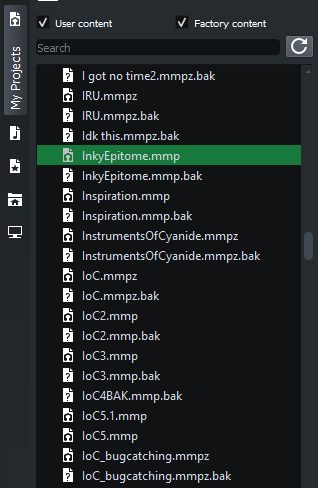
Double clicking a file will open it.
However, LMMS can only open MMP (LMMS project) and MMPZ (compressed LMMS project) files. It cannot run BAK (backup) files.
LMMS should be able to open (mmp and mmpz) BAK files when opened from the sidebar. (Note that some other programs also use bak, so it will need to be ensured that the file in question is a .mmp.bak or a .mmpz.bak and not any other bak.)
(Not restricted to "My projects," also extends to "Home" and essentially any sidebar window that displays directories.)
Justification
Convenience of opening a BAK file as easily as opening an MMP file without having to use open dialogue, rename the file, or manually opening through file explorer.
Contributor guide
No contributing guide indexed for this repository
First steps
- Read the whole issue, then the project's contributing guide.
- Comment on the issue to say you are picking it up — it saves two people doing the same work.
- Fork the repository and make your change on a branch.
- Open a pull request that references the issue number.
Research direction
Start by tracing the sidebar's double-click handling for files shown in "My projects," "Home," and other directory views, then find where LMMS accepts MMP and MMPZ extensions. Done means qualifying .mmp.bak and .mmpz.bak files open from any sidebar directory while unrelated .bak files remain unsupported.
Written by the indexing model from the issue text.
Assessment
- Tech stack
- cpp
- Domain
- desktop
- Issue type
- Feature
- Difficulty
- 3/5
- Estimated time
- 1-2 days
- Activity status
- Stale
- Clarity
- Mostly clear
- Newbie friendliness
- 45/100