Setting to "maximize" all sample/preset/instrument/project tabs
- Dominant language
- C++
- Stars
- 10.4k
- Forks
- 1.3k
- Avg merge
- 2d 13h
- Merged PRs (30d)
- 7
Description
## Enhancement Summary
I'd like to be able to "maximize" all of the tabs that appear on the left side of the screen. My Projects, My Samples, My Presets, etc.
#### Justification
The icons only show up as icons until clicked, and I constantly find myself clicking through them to remember which is which. Having an option to have the titles always displayed would be useful.
#### Mockup
Current Design vs. Mockup
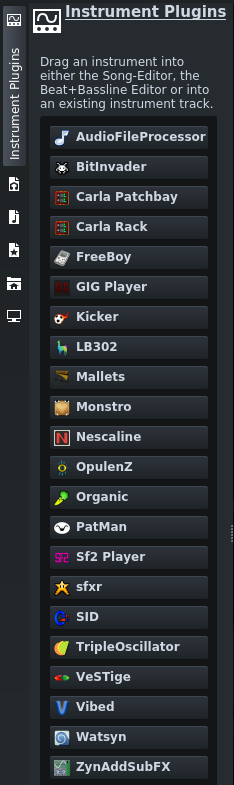 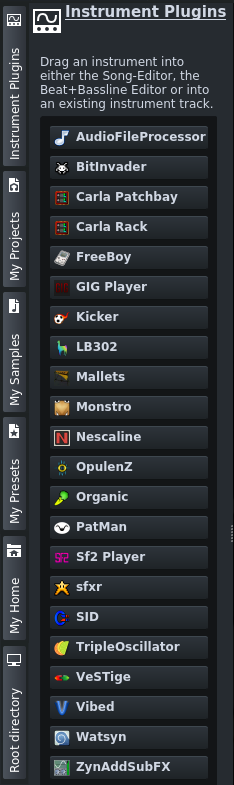
Thanks!! :smile:
Contributor guide
No contributing guide indexed for this repository
Research direction
No files or tests are named. Start by locating the left-side My Projects, My Samples, My Presets, instrument, and other tab UI, then trace how their collapsed or expanded state is controlled. Done means a setting can keep the tab titles visible consistently, matching the supplied mockup.
Written by the indexing model from the issue text.
Assessment
- Tech stack
- cpp
- Domain
- design, desktop
- Issue type
- Feature
- Difficulty
- 4/5
- Estimated time
- 3-5 days
- Activity status
- Stale
- Clarity
- Mostly clear
- Newbie friendliness
- 35/100