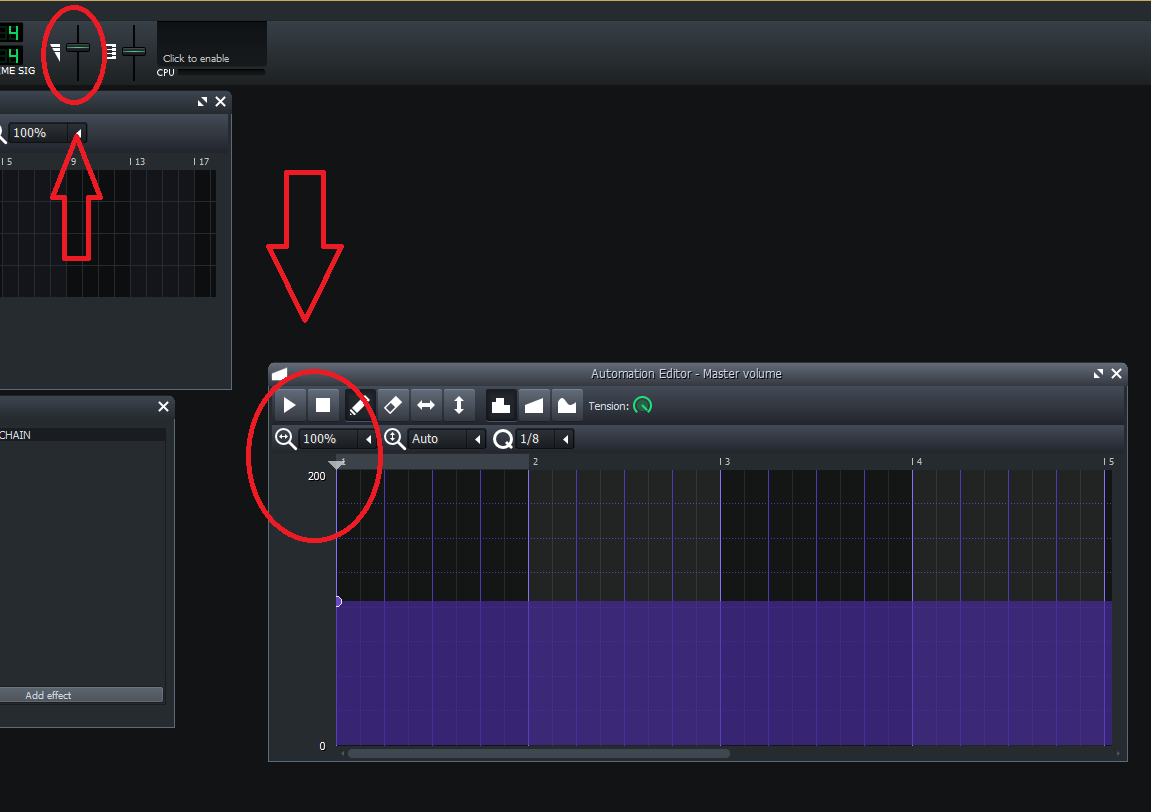
Range slider to adjust the Volume slider range to Exceed 200%
Nobody has claimed this yet.
- Dominant language
- C++
- Stars
- 10.4k
- Forks
- 1.3k
- Avg merge
- 2d 13h
- Merged PRs (30d)
- 7
Description
# Range Slider to Adjusting the Volume slider range to Exceed 200%.
For inspiration / the mock, please see https://github.com/LMMS/lmms/issues/5016
The way that this issue would be solved is similar to the PR above (and will affect the automation editor as well in a similar fashion), but this time it affects the volume slider to the left of the master pitch. One difference though, is that the range slider would be clamped at zero, as there cannot be negative volume. Another possible UX enhancement is that the slider can be adjusted by "Ones", but the volume range will decrease / increase by hundreds, given by the following recurrence 2 -> 200%, 3-> 300% 4 -> 400% max volume, etc.
Contributor guide
No contributing guide indexed for this repository
First steps
- Read the whole issue, then the project's contributing guide.
- Comment on the issue to say you are picking it up — it saves two people doing the same work.
- Fork the repository and make your change on a branch.
- Open a pull request that references the issue number.
Research direction
Review the referenced LMMS issue 5016 and the attached mock, then locate the volume slider left of the master pitch and the related automation editor controls. The change is complete when the volume range can exceed 200%, the range control is clamped at zero, and the corresponding automation behavior is updated; clarify whether the optional whole-number UX is required.
Written by the indexing model from the issue text.
Assessment
- Tech stack
- cpp
- Domain
- audio-video-rtc
- Issue type
- Feature
- Difficulty
- 4/5
- Estimated time
- 3-5 days
- Activity status
- Stale
- Clarity
- Mostly clear
- Newbie friendliness
- 45/100