Ghost notes: Show ghost icon in tco.
Nobody has claimed this yet.
- Dominant language
- C++
- Stars
- 10.4k
- Forks
- 1.3k
- Avg merge
- 2d 13h
- Merged PRs (30d)
- 7
Description
The phantom notes are very useful when composing, but when I have many patterns or tco and I want to modify the pattern I use as a guide, sometimes I get lost looking for it, and this can affect the workflow.
I suggest adding a '' ghost '' icon to the pattern that has been set as '' ghost notes ''. after setting the pattern:
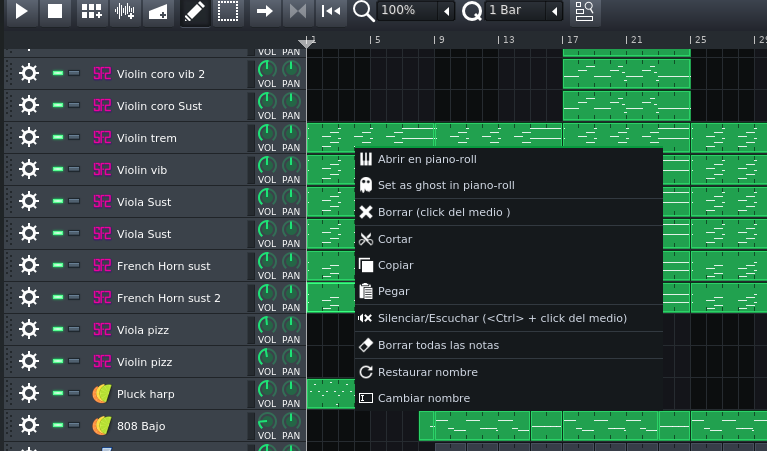
The pattern set as a ghost would look like this:
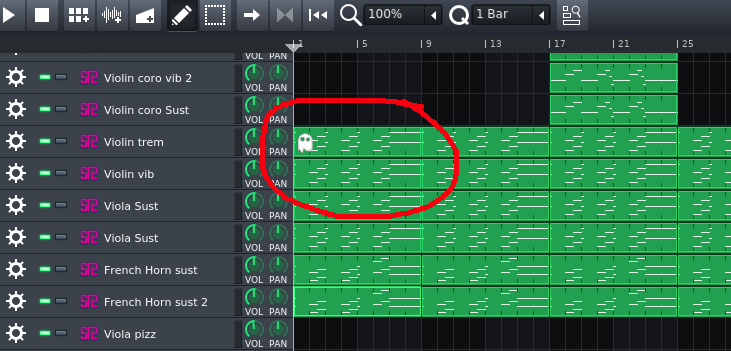
In this way we gain time.
Contributor guide
No contributing guide indexed for this repository
First steps
- Read the whole issue, then the project's contributing guide.
- Comment on the issue to say you are picking it up — it saves two people doing the same work.
- Fork the repository and make your change on a branch.
- Open a pull request that references the issue number.
Research direction
Start by reproducing how a pattern is set as ghost notes and inspect the TCO pattern UI where that state is displayed. The change is complete when the pattern designated as ghost visibly shows a ghost icon, matching the requested screenshots.
Written by the indexing model from the issue text.
Assessment
- Tech stack
- cpp
- Domain
- desktop
- Issue type
- Feature
- Difficulty
- 3/5
- Estimated time
- 1-2 days
- Activity status
- Stale
- Clarity
- Mostly clear
- Newbie friendliness
- 45/100