Song Editor: Effect panel model
Nobody has claimed this yet.
- Dominant language
- C++
- Stars
- 10.4k
- Forks
- 1.3k
- Avg merge
- 2d 13h
- Merged PRs (30d)
- 7
Description
Using ardor I realized how easy it is to add and remove effects in the mixer without even having to change windows. Everything is in a single window and is more practical.
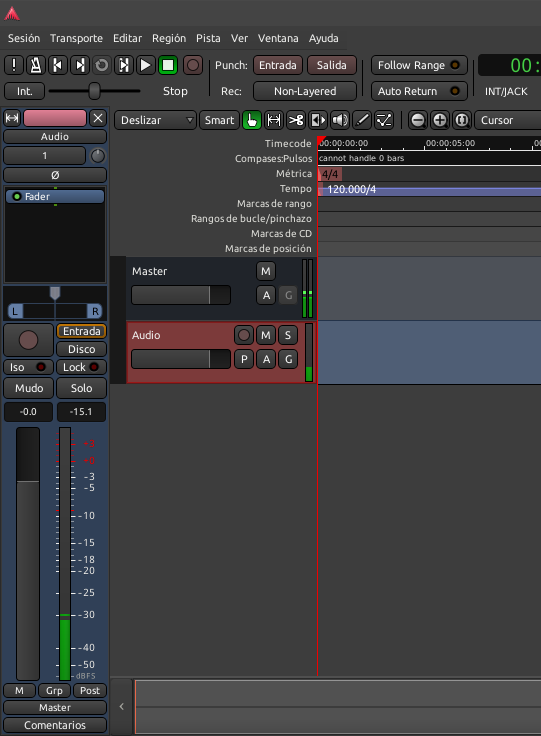
The management of effects in ardor is quite easy, while in LMMS we have the advantage of placing effects on the instruments as in the mixer. but the problem is when you have to add and remove many effects constantly, it is mandatory to change windows and give many clicks and this affects the workflow.
I suggest something like this:
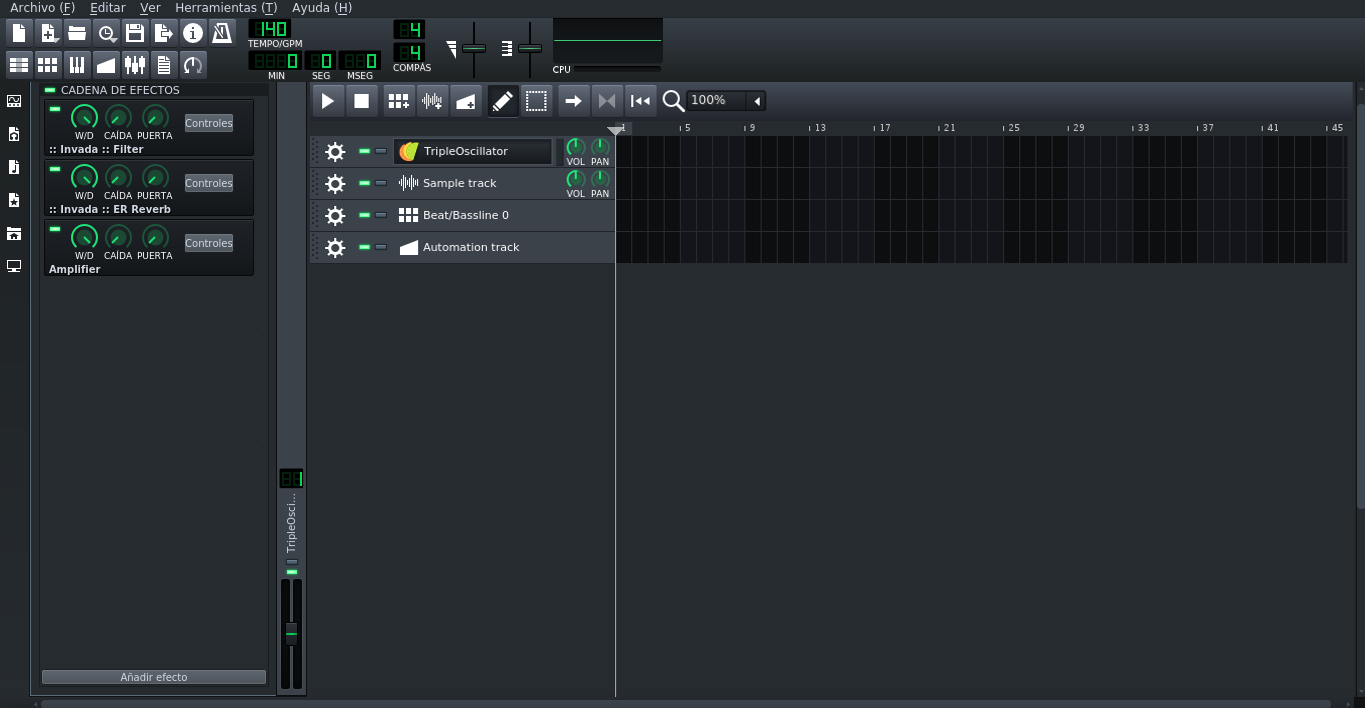
The management of effects in ardor is quite easy. and in LMMS we have the advantage of placing effects on both the instruments and the mixer simultaneously. But the problem is when you have to add and remove many effects constantly. currently we can open the mixer quickly by pressing F9 but still it is mandatory to have to change windows and give many clicks and this affects the workflow.
I suggest something like this:
This would be the closest thing to ardor. the effects window and the assigned instrument channel are displayed within the same song editor window. This would be better if it were optional, if I had a button on the left vertical bar to activate this function.
Once implemented this, it would work like this:
1- Open an instrument.
2- Assign a channel.
3- The effects panel appears (In case the option is activated)
4- Add effects.
This feature would greatly improve the workflow, since this function would be in a single window and with just a few clicks you could add and remove effects. regards
Contributor guide
No contributing guide indexed for this repository
First steps
- Read the whole issue, then the project's contributing guide.
- Comment on the issue to say you are picking it up — it saves two people doing the same work.
- Fork the repository and make your change on a branch.
- Open a pull request that references the issue number.
Research direction
No files, tests, or entry points are named. Begin by locating the Song Editor and existing instrument-channel and effect-panel code, then clarify the optional panel workflow and define completion around adding and removing effects without switching windows.
Written by the indexing model from the issue text.
Assessment
- Tech stack
- cpp
- Domain
- desktop, frontend
- Issue type
- Feature
- Difficulty
- 5/5
- Estimated time
- Over a week
- Activity status
- Stale
- Clarity
- Mostly clear
- Newbie friendliness
- 30/100