Measure number in piano roll editor to match song editor (V 1.2.0 RC4)
- Dominant language
- C++
- Stars
- 10.4k
- Forks
- 1.3k
- Avg merge
- 2d 13h
- Merged PRs (30d)
- 7
Description
Win32, 1.2.0 RC4
It would be very useful if the Piano Roll editor (and Automation Editor) measure numbers matched the Song Editor measure number. I was putting in a ritardando in the middle of a song that lasted only a few measures. I inserted the automation, dragged it out to three measures, CTRL-dragged the tempo on it and opened the Automation Editor. The editor starts at measure 1, regardless of where in the song the block actually starts. I found it surprisingly difficult to get the ritardando in the correct place, mostly because, since the scaling for a BPM controller goes from 0-990, a drop of 50BPM was hard to see in the timeline thumbnail (and the thumbnail view isn't quite accurate).
It would be a good thing to know, in the piano roll editor and automation editor, what measure I'm working on in the context of the song, even (especially) if the clip in the song editor doesn't start at measure 1. (Because of the different way that measures work in the B+B editor, this is less important, if not irrelevant in that particular context—they should probably always start at 1.)
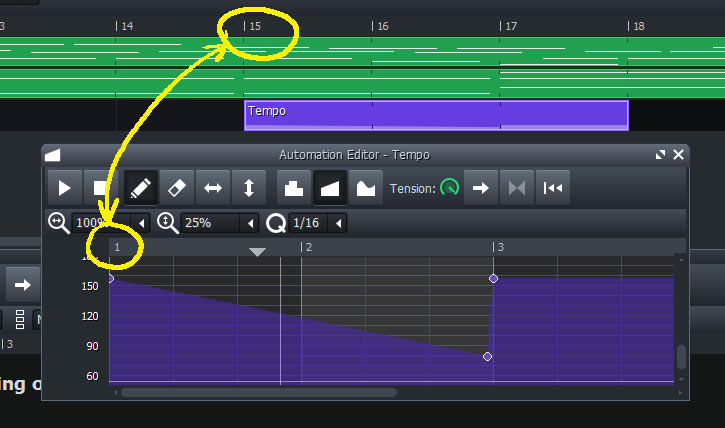
Whether this is a global change or just a display option, it would make the track number in the sub-editors more useful, especially in longer compositions.
Icing on the cake would be real-time updates of the measure numbers in the Piano Roll and Automation editors if the clip is dragged to a different position in the song editor timeline.
Contributor guide
No contributing guide indexed for this repository
Research direction
Start by locating the Piano Roll editor, Automation Editor, and Song Editor entry points; the issue does not name files or tests. Compare how each editor derives and displays measure numbers, then determine the intended behavior for clips that start later in the song. Done means the sub-editors show song-context measure numbers, with updates after a clip is moved if that scope is accepted.
Written by the indexing model from the issue text.
Assessment
- Tech stack
- cpp
- Domain
- desktop
- Issue type
- Feature
- Difficulty
- 5/5
- Estimated time
- Over a week
- Activity status
- Stale
- Clarity
- Mostly clear
- Newbie friendliness
- 35/100