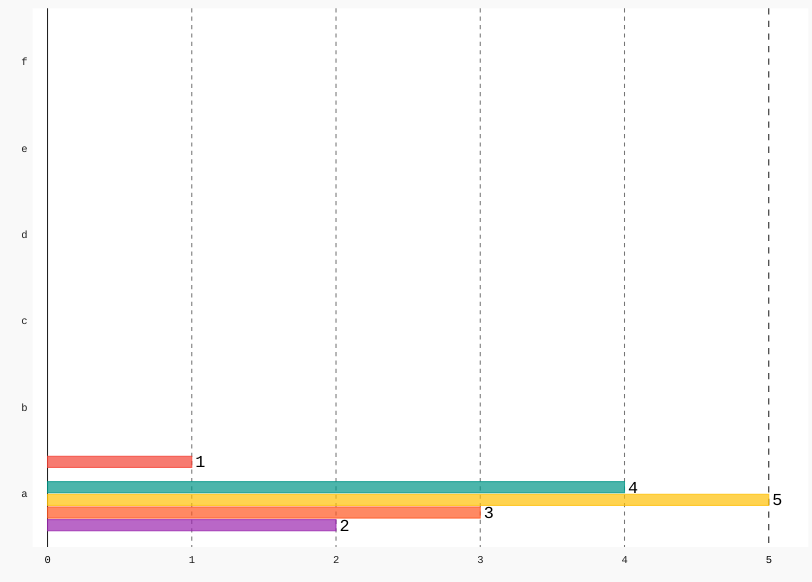
x_labels are no places next to values
- Dominant language
- Python
- Stars
- 2.8k
- Forks
- 419
- PR merge metrics
- No merged PRs in 30d
Description
```python
config = pygal.Config(
fill=True,
show_legend=False,
print_zeroes=False,
print_values=True,
print_labels=False,
print_values_position='top'
)
bar_chart = pygal.HorizontalBar(config)
bar_chart.add('', 1)
bar_chart.add('', 0)
bar_chart.add('', 4)
bar_chart.add('', 5)
bar_chart.add('', 3)
bar_chart.add('', 2)
```
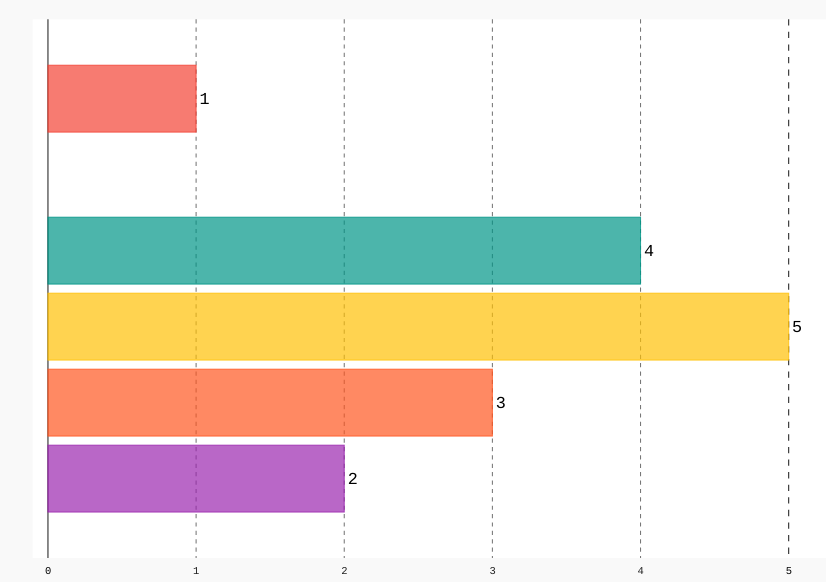
```python
config = pygal.Config(
fill=True,
show_legend=False,
print_zeroes=False,
print_values=True,
print_labels=False,
print_values_position='top'
)
bar_chart = pygal.HorizontalBar(config)
bar_chart.add('', 1)
bar_chart.add('', 0)
bar_chart.add('', 4)
bar_chart.add('', 5)
bar_chart.add('', 3)
bar_chart.add('', 2)
bar_chart.x_labels = ['a','b','c','d','e','f']
```
Contributor guide
Research direction
Start by running the two Python snippets against pygal and compare the HorizontalBar output with and without x_labels. Trace the label and value positioning used by HorizontalBar, then add a regression test for the reproduced case. Done means x_labels are placed next to their corresponding values without breaking the existing output.
Written by the indexing model from the issue text.
Assessment
- Tech stack
- python
- Domain
- data-visualization
- Issue type
- Bug
- Difficulty
- 3/5
- Estimated time
- 1-2 days
- Activity status
- Stale
- Clarity
- Mostly clear
- Newbie friendliness
- 45/100