Eliminate heavier weighted y-axis grid lines
- Dominant language
- Python
- Stars
- 2.8k
- Forks
- 419
- PR merge metrics
- No merged PRs in 30d
Description
I'm quite new to `pygal` and noticed I was getting heavier lines on every 10th y-axis grid line. In looking at the docs, I figured [`y_labels_major`](http://pygal.org/en/stable/documentation/configuration/label.html#y-labels-major) was what I was looking for.
The example for the option has no such heavy grid lines:
```
chart.y_labels_major = []
```
The very next example *does* have them:
```
chart.y_labels_major = [.0001, .0004]
```
Seemed pretty clear... either use none with an empty list, or specify which to use. Unfortunately, it didn't work as expected on my real world example. Here's an example:
```
chart = pygal.Line(width=600, height=400,
explicit_size=True, show_legend=False)
chart.y_labels_major = []
chart.add('line', list(range(25)))
chart
```
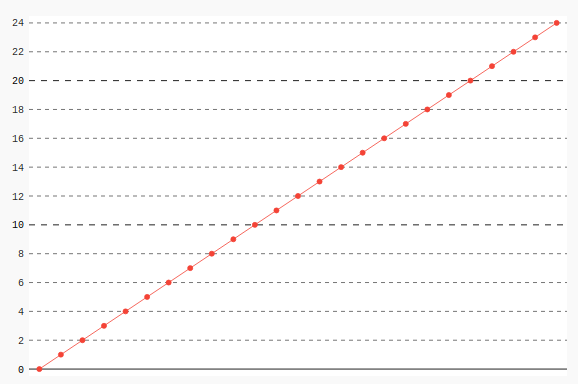
Either of these will make those lines go away:
```
chart.y_labels_major = ['']
chart.y_labels_major = [0]
```
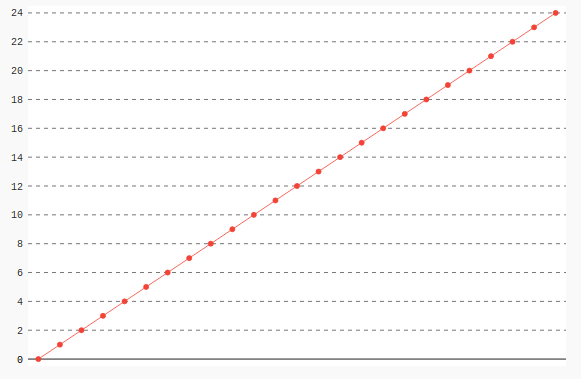
Could you kindly point me in the right direction for removing these lines the proper way?
Contributor guide
Research direction
Start by running the provided pygal.Line example with y_labels_major set to an empty list and compare it with the [''] and [0] workarounds. Trace how y_labels_major affects y-axis labels and grid lines; done means an empty list removes the heavier grid lines as the documentation indicates.
Written by the indexing model from the issue text.
Assessment
- Tech stack
- python
- Domain
- data-visualization
- Issue type
- Bug
- Difficulty
- 3/5
- Estimated time
- 1-2 days
- Activity status
- Stale
- Clarity
- Mostly clear
- Newbie friendliness
- 48/100