Suggested UI improvements for documentation pop-up positioning
- Dominant language
- JavaScript
- Stars
- 776
- Forks
- 180
- PR merge metrics
- No merged PRs in 30d
Description
Received this on ZenDesk:
"When trying to add a new shape, the parameters of the previous shape are covered up. In order to see the previous parameters, the user must click elsewhere to get the help-text bubble to uncover the previous line of code.
It would be more useful if the help text were either below the current line, to the side, or outside the field-of-view entirely (like at the bottom of the coding area).
In this picture, you can see a sample of how the help-text bubble (black) is covering up the previous parameters which a user might refer to during the current line of code:
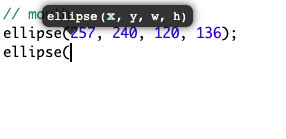
"
Putting it below the current line of code is probably the easiest and would cover a large % of situations, especially for new programmers who are most likely to write top to bottom.
Contributor guide
No contributing guide indexed for this repository
Research direction
Start by locating the documentation help-text bubble and its positioning logic in the live editor; the issue does not name a file or test. Reproduce the overlap shown in the screenshot, then verify that the bubble no longer covers previous parameters and is positioned below the current line where possible.
Written by the indexing model from the issue text.
Assessment
- Tech stack
- javascript
- Domain
- frontend
- Issue type
- Feature
- Difficulty
- 3/5
- Estimated time
- 1-2 days
- Activity status
- Stale
- Clarity
- Mostly clear
- Newbie friendliness
- 38/100