Show nag for Windows Console users to use Windows Terminal
- Dominant language
- Rust
- Stars
- 1.3k
- Forks
- 116
- Avg merge
- 12h 34m
- Merged PRs (30d)
- 19
Description
This came out of a Slack discussion. I'm not sure it actually is a good idea, so please leave your feedback here!
On Windows 10 and older Windows 11 versions the Windows Console Host is the default terminal. With newer Windows 11 builds, the new and shiny Windows Terminal is the default. Broadly speaking, Julia looks great on Windows Terminal, but there are various display problems on the Windows Console Host. As an example, for standard package operations we get this on Windows Console Host:
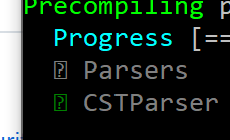
Note how it shows boxes with question marks, and there are other problems like that as well.
The MSIX installer that we use on Windows (for both the Windows Store and App Installer methods) installs three entry points to Julia:
1. A start menu entry.
2. A profile in Windows Terminal (the new, shiny one).
3. An execution alias, essentially it puts `julia` and `juliaup` on the `PATH`.
When a user launches Julia via 1) the start menu entry will start Julia in the default terminal. Depending on which Windows version a user has, this might in the end use Windows Terminal or Windows Console Host. Here is my understanding of this right now:
- On Windows 11 22H2 and newer Windows Terminal is the default. For new Windows installs I'm sure everything is perfect. I am not sure whether Windows Terminal automatically becomes the default if one updates from an older Windows version to Win 11 22H2, or whether one has to make a settings change. My best guess is that it is automatic.
- On older Windows 11 versions (pre 22H2) one can install Windows Terminal from the Windows Store and then make it the default terminal. At that point the start menu entry will launch in the Windows Terminal. _But_, that is a manual install and configuration step one needs to take.
- On Windows 10 one can install Windows Terminal from the Windows Store, but there is no way to make it the default terminal, so the start menu entry will always launch Julia in the Windows Console Host.
So generally everything works like a charm on Windows 11 22H2, but the further one moves away from that recent Windows version to older versions, the less ideal things are.
One idea here could be that we add logic to `julialauncher` that detects when we run in the Windows Console Host and then print a short message like this before we actually launch Julia:
```
You are running Julia in the legacy Windows Console Host that is not
displaying all Julia output correctly. Consider using Windows Terminal
instead, which you can install from https://....
```
The problem of course is that this by itself won't change the behavior of the start menu entry... On Windows 11 we could also show instructions on how to switch the default terminal, but at that point it might all get a bit involved...
And on Windows 10 the start menu entry just can't be fixed, really. Really what users _should_ be doing there is install Windows Terminal from the Windows Store, and then always launch Windows Terminal, and then Julia inside there, rather than use the Julia start menu entry.
And such a nag might also be quite annoying...
Contributor guide
No contributing guide indexed for this repository
Research direction
Start by inspecting the julialauncher entry point and how it launches Julia on Windows. The proposed outcome is to detect the legacy Windows Console Host and display a brief Windows Terminal recommendation before launching, but the issue leaves the behavior and platform details open for discussion.
Written by the indexing model from the issue text.
Assessment
- Tech stack
- rust
- Domain
- cli, operating-systems
- Issue type
- Feature
- Difficulty
- 4/5
- Estimated time
- 3-5 days
- Activity status
- Stale
- Clarity
- Needs clarification
- Newbie friendliness
- 30/100