Joystream / Joystream/joystream
HOWTO: Deploy a Playground
Nobody has claimed this yet.
- Dominant language
- Rust
- Stars
- 1.4k
- Forks
- 116
- PR merge metrics
- No merged PRs in 30d
Description
What is a playground
A playground is a temporary deployment of a single node into the cloud (currently on AWS) which all the joystream infrastructure services running on that single machine. Its state is persisted as long as the node remains online (if it is rebooted it much be brought up within a short time period, 2minutes at most for the chain to continue producing blocks without error)
- joystream-node dev chain (single validator - equivalent of running joystream-node --dev) where Alice is sudo and has initial token allocation
- Query Node
- Orion
Optionally
- Configured storage infrastructure, 1 storage node and 1 distributor node
- Configured membership faucet service
Use-case
Deploying a test environment from a given branch for testing runtime and applications in a collaborative way.
What does a playground not provide
The playground does not deploy any front end applications (Pioneer, Atlas, Polkadot-js Apps)
On successful deployment, the Playground URL endpoints for all the infrastructure services are provided so those applications can be configured or pointed at the playground deployment.
Customizability
Currently only option at deployment time is whether to initialize the chain with working group leads and simple storage infrastructure, plus the membership faucet.
How to start a playground
Prerequisites:
- User must have write-access permission on the joystream mono-repo.
- Branch selected for deployment must build (all CI checks passing)
- The "Deploy Playground" action exists on the deployment branch.
- Branch name must conform to AWS valid stack name "[a-zA-Z][-a-zA-Z0-9]*" -> starts with a letter and is followed by zero or more hyphens, letters and/or digits
A playground is deployed through a special github action workflow called "Deploy Playground"
Steps:
- Visit: https://github.com/Joystream/joystream/actions/workflows/deploy-playground.yml
- Click on "Run workflow" drop down menu.
- Customize the settings
Recommended to use your name as the "additional identifier" that will be prefixed to the stack name.
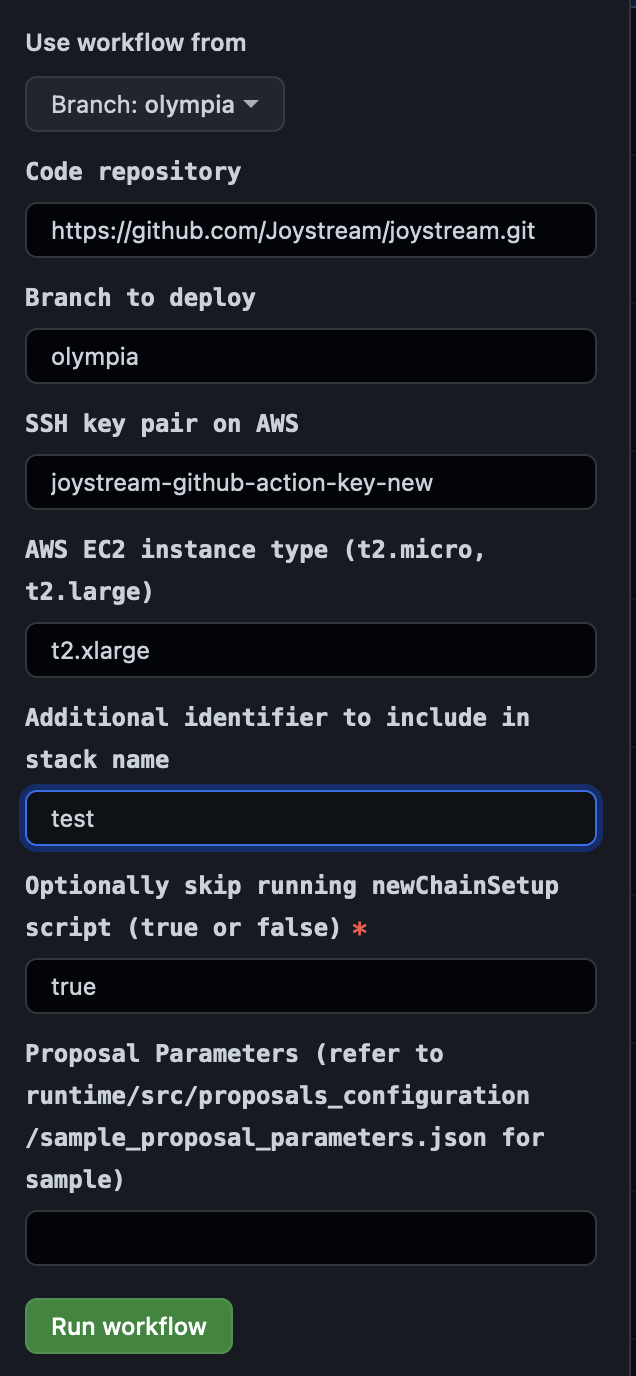
- Click "Run workflow" button, then go grab a drink..
Here is an old example run: https://github.com/Joystream/joystream/actions/runs/1962348214
- Download the endpoints artifact file which will be a zip file containing an endpoints.json file
{"websocket_rpc": "wss://52.91.200.121.nip.io/ws-rpc", "http_rpc": "https://52.91.200.121.nip.io/http-rpc", "colossus": "https://52.91.200.121.nip.io/colossus-1", "distributor": "https://52.91.200.121.nip.io/distributor-1", "graphql_server": "https://52.91.200.121.nip.io/query-node/server/graphql", "graphql_server_websocket": "wss://52.91.200.121.nip.io/query-node/server/graphql", "indexer": "https://52.91.200.121.nip.io/query-node/indexer/graphql", "member_faucet": "https://52.91.200.121.nip.io/member-faucet/register", "orion": "https://52.91.200.121.nip.io/orion/graphql", "config": "https://52.91.200.121.nip.io/network/config.json", "stack_name": "leszek-olympia-26"}
Once you have this endpoint information you can use polkadot-js apps and use custom endpoint wss://52.91.200.121.nip.io/ws-rpc
For pioneer-2 you can use the config endpoint like so*:
TODO: *Need to deploy an instance of pioneer that is not overriding the network-config
Contributor guide
No contributing guide indexed for this repository
First steps
- Read the whole issue, then the project's contributing guide.
- Comment on the issue to say you are picking it up — it saves two people doing the same work.
- Fork the repository and make your change on a branch.
- Open a pull request that references the issue number.
Research direction
Review the existing HOWTO against the Deploy Playground workflow at .github/workflows/deploy-playground.yml and the documented endpoints artifact. Check whether the workflow steps, prerequisites, links, and Pioneer configuration example still match current behavior; done means the deployment instructions are accurate and reproducible.
Written by the indexing model from the issue text.
Assessment
- Tech stack
- aws, github-actions
- Domain
- cloud, devops, documentation
- Issue type
- Documentation
- Difficulty
- 2/5
- Estimated time
- 1-3 hours
- Activity status
- Stale
- Clarity
- Needs clarification
- Newbie friendliness
- 25/100