InsightSoftwareConsortium / InsightSoftwareConsortium/itkwidgets
Point set tools are not displayed
- Dominant language
- Python
- Stars
- 624
- Forks
- 83
- PR merge metrics
- No merged PRs in 30d
Description
## Overview
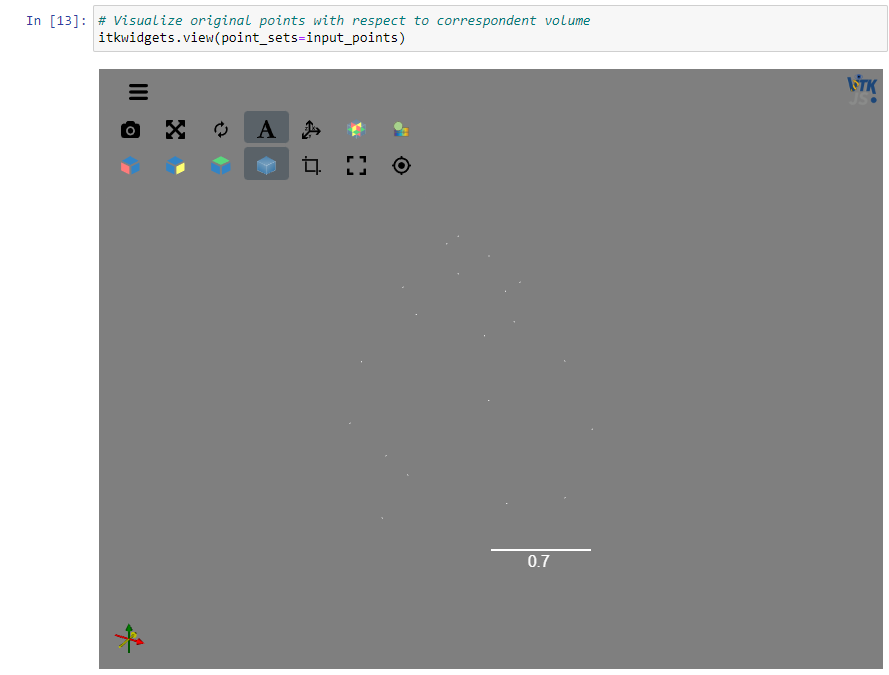
When trying to view a point set in a scene by itself the individual points are very small. From conversation with @PaulHax it sounds like there are existing tools for adjusting point size that are intended to be displayed, but are not.
## Expected behavior
Tools are available to adjust point set size and possibly other details such as point color.
## Observed behavior
3D points are displayed, but no tool is given for adjusting point size. Default size is small, white points that are hard to see against light gray background.
## Versions
itkwidgets==1.0a22
itk==5.3.0
notebook==6.1.6
## Platforms
Windows 10
Google Chrome browser
## Other notes
- In the screenshot above, `type(input_points)` is `itk.itkPointSetPython.itkPointSetF3`
- Screenshots of landmark points in the [`ThinPlateSpline.ipynb` example notebook](https://github.com/bnmajor/itkwidgets/blob/c9ff7ed9fb073ca060bde2a15deba4367e029697/examples/integrations/itk/ThinPlateSpline.ipynb) on GitHub seem to show similar behavior.
Contributor guide
No contributing guide indexed for this repository
Assessment
This issue has not been assessed yet.