Immediate-Mode-UI / Immediate-Mode-UI/Nuklear
tab button hovering style is not working
Nobody has claimed this yet.
- Dominant language
- C
- Stars
- 11.4k
- Forks
- 686
- Avg merge
- 4d 1h
- Merged PRs (30d)
- 3
Description
Hi,
I am trying to set the tab button and text to change their color when hovered.
So far I got this:
```
/* tab button */
button = &style->tab.tab_minimize_button;
nk_zero_struct(*button);
button->normal = nk_style_item_color(nk_rgb(255,0,0)); /* RED */
button->hover = nk_style_item_color(nk_rgb(0,255,0)); /* GREEN */
button->active = nk_style_item_color(nk_rgb(0,0,255)); /* BLUE */
button->border_color = nk_rgb(0,0,255);
button->text_background = table[NK_COLOR_TAB_HEADER];
button->text_normal = nk_rgb(0,0,255); /* BLUE */
button->text_hover = nk_rgb(0,255,0); /* GREEN */
```
I do get the blue arrow and red square:
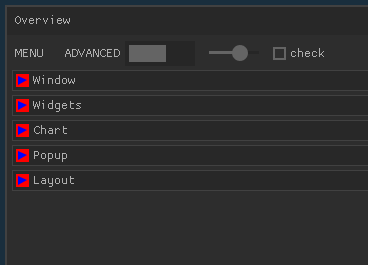
However, when i hover these elements (or the tab) with the mouse cursor, they do not turn green. How can this be fixed?
Thanks,
Note: Linux, glfw_opengl2
Contributor guide
First steps
- Read the whole issue, then the project's contributing guide.
- Comment on the issue to say you are picking it up — it saves two people doing the same work.
- Fork the repository and make your change on a branch.
- Open a pull request that references the issue number.
Research direction
Start with the tab_minimize_button styling shown in the issue and reproduce it using the glfw_opengl2 setup. Trace how hover state is handled for the tab button and its text; the issue is done when hovering the tab elements visibly applies the configured green colors.
Written by the indexing model from the issue text.
Assessment
- Tech stack
- c
- Domain
- desktop
- Issue type
- Bug
- Difficulty
- 3/5
- Estimated time
- 1-2 days
- Activity status
- Stale
- Clarity
- Mostly clear
- Newbie friendliness
- 35/100