Icinga / Icinga/icinga-powershell-plugins
Invoke-IcingaCheckUsers should not count service/computer accounts
@LordHepipud is already working on this.
Since Nov 16, 2020.
- Dominant language
- PowerShell
- Stars
- 55
- Forks
- 30
- PR merge metrics
- No merged PRs in 30d
Description
Hello,
right now the commands also counts service and cimputer accounts as logged in users and also a logged inuser multiple times even if he is logged in only once.
Iam not used to Powershell, but maybe this will help on how to get the user count correctly https://thesysadminchannel.com/get-logged-in-users-using-powershell/
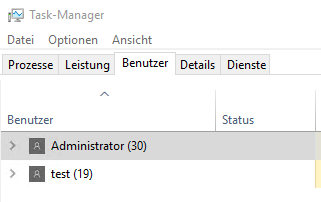
Given on a test machine arte this users logged in:
Invoke-IcingaCheckUsers:
PS C:\Users\Administrator> Invoke-IcingaCheckUsers
[OK] Check package "Users"
| 'logged_on_users_umfd2'=1;; 'logged_on_users_umfd4'=1;; 'logged_on_users_umfd0'=1;; 'logged_on_users_system'=1;; 'logged_on_users_umfd3'=1;; 'logged_on_users'=16;; 'logged_on_users_dwm3'=1;; 'logged_on_users_dwm4'=1;; 'logged_on_users_dwm2'=1;; 'logged_on_users_test'=3;; 'logged_on_users_lokaler_dienst'=1;; 'logged_on_users_administrator'=3;; 'logged_on_users_netzwerkdienst'=1;;
Get-LoggedInUser:
ComputerName UserName      SessionID SessionState
------------ --------      --------- ------------
VM35297      administrator 3         Aktiv
VM35297      test          4         Aktiv
Also iam not a windows administrator, so maybe remote powershell oder remote shell should also be testet, but for sure not system/service accounts
Best regards,
Carsten
Contributor guide
No contributing guide indexed for this repository
First steps
- Read the whole issue, then the project's contributing guide.
- Comment on the issue to say you are picking it up — it saves two people doing the same work.
- Fork the repository and make your change on a branch.
- Open a pull request that references the issue number.
Assessment
This issue has not been assessed yet.