Curation Labels: When label sets are defined, there is no default for root dv resulting in a minor init issue.
Nobody has claimed this yet.
- Dominant language
- Java
- Stars
- 1.1k
- Forks
- 564
- Avg merge
- 2d 2h
- Merged PRs (30d)
- 29
Description
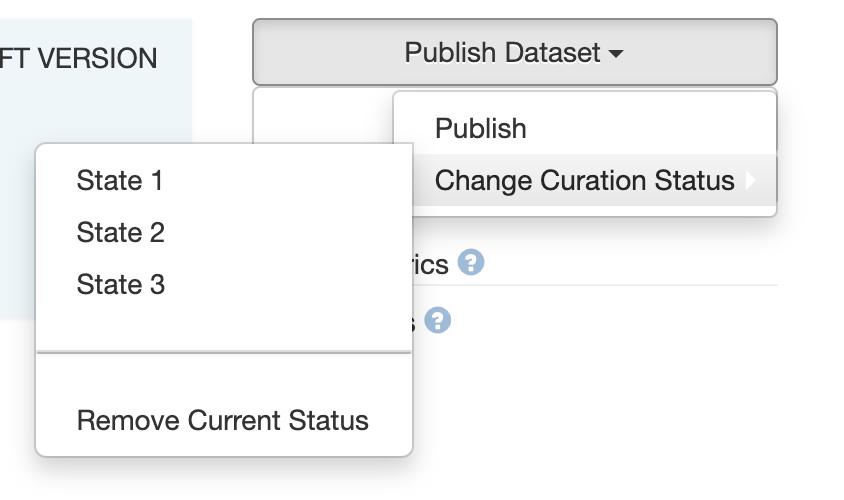
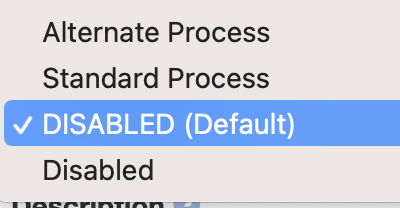
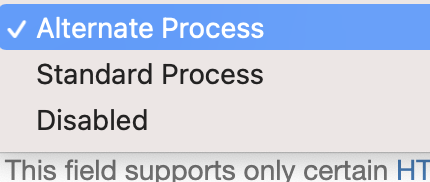
Using the example in the guides, standard and alternate sets, these appear as options in the root dv general info but the list shows Alternate set when first visiting the page, as if it were selected. However, no curation label option appears under the publish button for datasets created in root. To correct this, first disable the curation label set, save, then select the set if any you want, save. This does not happen with sub dv's, where it shows disabled by default.
Contributor guide
First steps
- Read the whole issue, then the project's contributing guide.
- Comment on the issue to say you are picking it up — it saves two people doing the same work.
- Fork the repository and make your change on a branch.
- Open a pull request that references the issue number.
Research direction
Start by reproducing the curation-label behavior from the guides example for root and sub data views, comparing the initial selection and the publish-button options. Done means a root data view defaults to the disabled state and its curation-label option behaves consistently with sub data views.
Written by the indexing model from the issue text.
Assessment
- Tech stack
- java
- Domain
- frontend
- Issue type
- Bug
- Difficulty
- 3/5
- Estimated time
- 1-2 days
- Activity status
- Stale
- Clarity
- Mostly clear
- Newbie friendliness
- 35/100