Date columns in Excel ingest incorrectly as days since January 1st, 1900
Nobody has claimed this yet.
- Dominant language
- Java
- Stars
- 1.1k
- Forks
- 564
- Avg merge
- 2d 2h
- Merged PRs (30d)
- 29
Description
When importing an Excel sheet (.xlsx) with a date column, the dates in the ingested .tab file are converted to large numbers (roughly corresponding to the days since January 1, 1900). That's regardless of how the dates are stored in Excel (I tried both YYYY-MM-DD and MM/DD/YYYY)
You can see this in this deposit:
https://demo.dataverse.org/dataset.xhtml?persistentId=doi%3A10.70122%2FFK2%2FFL31GB
Here's the Excel
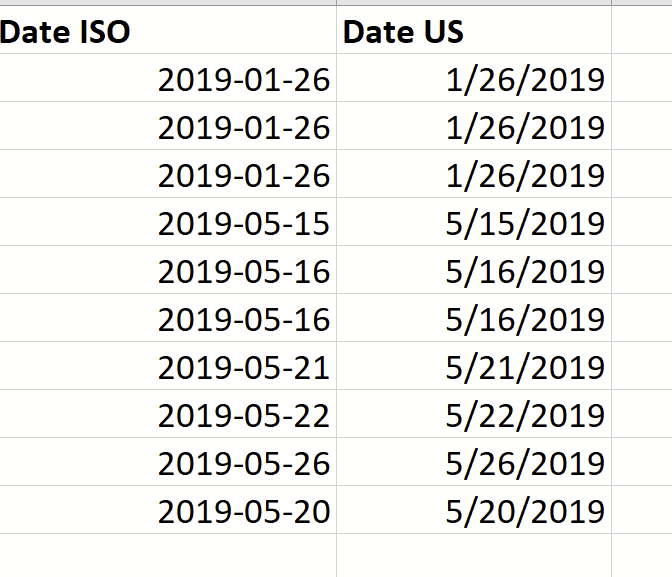
And here's the preview of the .tab (same behavior when downloaded)
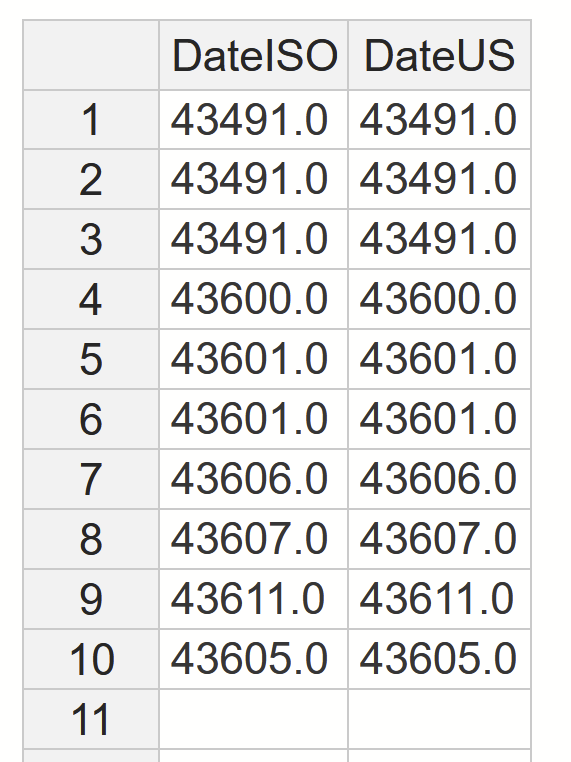
I think it's pretty clear that this is undesirable. FWIW, Excel itself exports the dates as formatted to CSV when using Save as...
Contributor guide
First steps
- Read the whole issue, then the project's contributing guide.
- Comment on the issue to say you are picking it up — it saves two people doing the same work.
- Fork the repository and make your change on a branch.
- Open a pull request that references the issue number.
Research direction
Reproduce the problem using the linked deposit and its .xlsx file, then trace the Excel ingest path that produces the .tab preview. Check how date cells are converted and add coverage for the reported date formats; done means imported dates are readable date values rather than Excel serial numbers.
Written by the indexing model from the issue text.
Assessment
- Tech stack
- java
- Domain
- data
- Issue type
- Bug
- Difficulty
- 3/5
- Estimated time
- 1-2 days
- Activity status
- Stale
- Clarity
- Mostly clear
- Newbie friendliness
- 38/100