HumanSignal / HumanSignal/label-studio
No Icon for "Delete All Regions" Button
- Dominant language
- TypeScript
- Stars
- 28.3k
- Forks
- 3.7k
- Avg merge
- 14h
- Merged PRs (30d)
- 15
Description
**Describe the bug**
There is no visible icon for the "Delete All Regions" button when labeling, making the button invisible.
Tried searching issues to see if this had been reported already, but didn't find an existing issue, so opening this one.
**To Reproduce**
1. Create a project for labeling images
2. Go to label view for an image
3. Look at the side bar on the right side
**Expected behavior**
See "Regions" and "Labels" radio button, there is a "Delete All Regions" button to the right which is present, but not visible since there is no icon shown. The button should be visible. Hovering over it shows the tool tip (it renders off to the left).
**Screenshots**
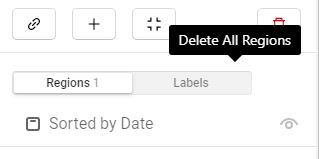
**Environment (please complete the following information):**
- OS: Windows 11
- Label Studio Version: 1.3
Contributor guide
Assessment
This issue has not been assessed yet.