HaxeFlixel / HaxeFlixel/flixel
Game filters: wrong size?
Nobody has claimed this yet.
- Dominant language
- Haxe
- Stars
- 2.2k
- Forks
- 522
- Avg merge
- 34m
- Merged PRs (30d)
- 1
Description
Code snippet reproducing the issue:
PlayState.hx
package;

import flixel.text.FlxText;
import flixel.system.FlxAssets.FlxShader;
import openfl.filters.ShaderFilter;
import flixel.FlxG;
import flixel.FlxState;

class PlayState extends FlxState
{
	override public function create():Void
	{
		super.create();
		FlxG.game.setFilters([new ShaderFilter(new BorderShader())]);
		FlxG.game.filtersEnabled = true;

		var text = new FlxText();
		text.text = "Hello World!";
		text.screenCenter();
		add(text);
	}

	override public function update(elapsed:Float):Void
	{
		super.update(elapsed);
		if (FlxG.mouse.pressed) FlxG.camera.shake(0.01, 0.1);
		if (FlxG.keys.anyJustPressed([ONE])) FlxG.game.filtersEnabled = !FlxG.game.filtersEnabled;
	}
}


class BorderShader extends FlxShader
{

	@:glFragmentSource("
        #pragma header

		void main()
		{
			vec2 uv = openfl_TextureCoordv;
			vec3 col = texture2D(bitmap, vec2(uv)).rgb;

			if ((uv.x > 0.0 && uv.x < 0.2) || (uv.x < 1.0 && uv.x > 0.8) || (uv.y > 0.0 && uv.y < 0.2) || (uv.y < 1.0 && uv.y > 0.8)) {
				gl_FragColor = vec4(1., 0., 0., 1.);
				return;
			}
			gl_FragColor = vec4(col, 1.);
		}
	")

	public function new()
	{
        super();
	}
}
Observed behavior:
Game filters appear to detect wrong game size.
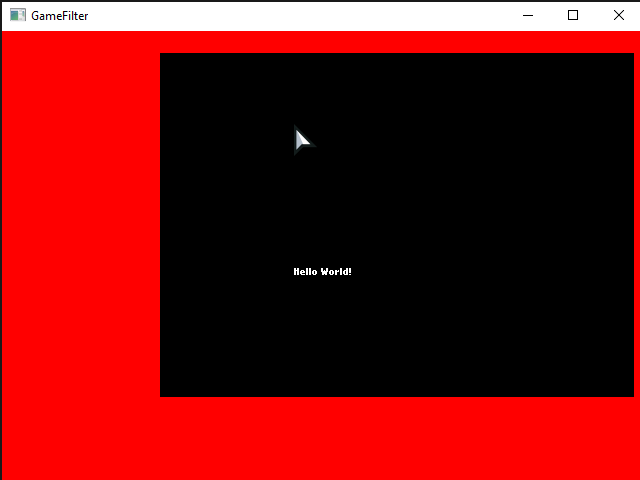
This is filter applied to whole game
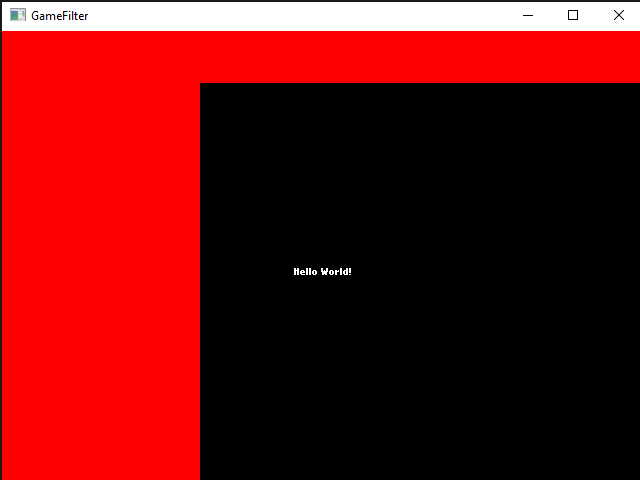
This is filter applied to whole game after a camera shake
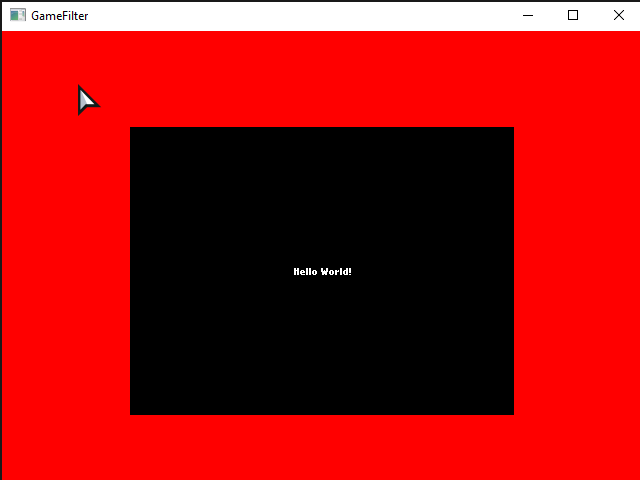
This is filter applied to camera
Expected behavior:
Game filter to look like camera filter
In last image bottom border != top border because screenshot cut lowest part to keep window toolbar (dunno why).
Contributor guide
First steps
- Read the whole issue, then the project's contributing guide.
- Comment on the issue to say you are picking it up — it saves two people doing the same work.
- Fork the repository and make your change on a branch.
- Open a pull request that references the issue number.
Research direction
Start with the PlayState.hx reproduction and compare the whole-game filter with the camera filter shown in the issue, including after a camera shake. The work is done when the game filter uses the correct game size and visually matches the camera filter behavior.
Written by the indexing model from the issue text.
Assessment
- Domain
- game-dev
- Issue type
- Bug
- Difficulty
- 4/5
- Estimated time
- 3-5 days
- Activity status
- Stale
- Clarity
- Mostly clear
- Newbie friendliness
- 38/100