HandyOrg / HandyOrg/HandyControl
[Feature request]希望TabContrl使用绑定的TableItem可以通过ShowCloseButton关闭
Nobody has claimed this yet.
- Dominant language
- C#
- Stars
- 7.2k
- Forks
- 1.2k
- PR merge metrics
- No merged PRs in 30d
Description
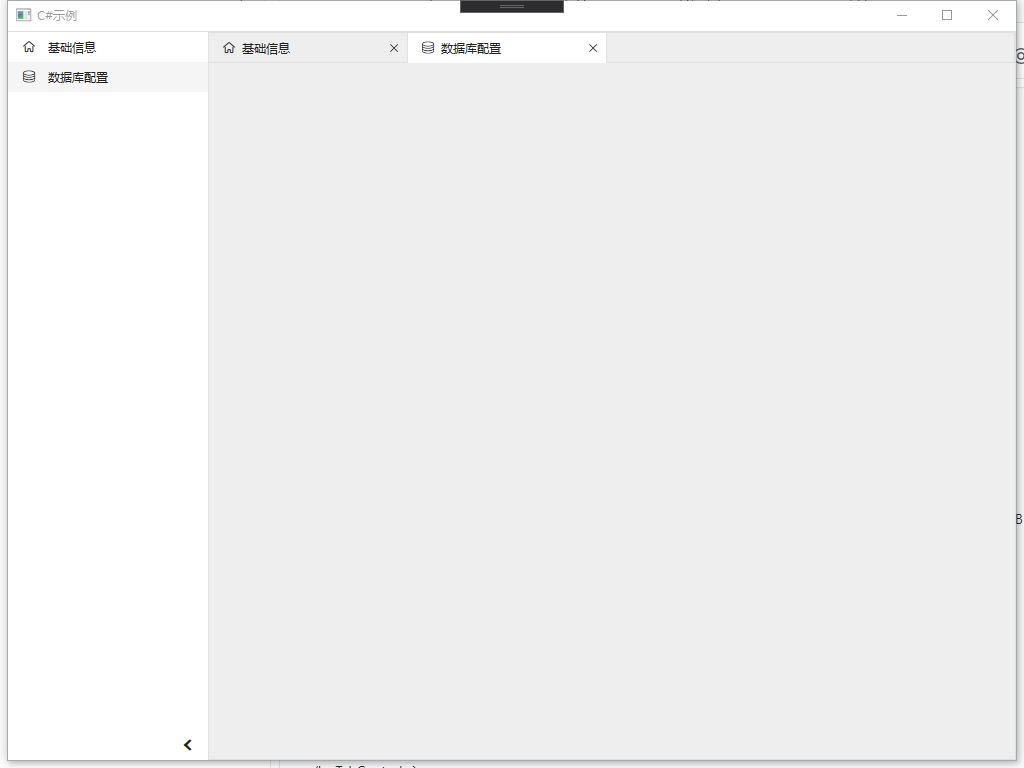
使用场景如下:
某些TabItem我需要在首项显示,且固定不可关闭。
通过如下代码结构
<hc:TabControl>
 <hc:TabItem ShowCloseButton="False" Header="Home"/>
 <hc:TabItem ShowCloseButton="True" Header="TabItem1"/>
 </hc:TabControl>
但是通过绑定的方式,却不能实现
<hc:TabControl IsAnimationEnabled="True"
 ShowCloseButton="True"
 ShowOverflowButton="True"
 IsScrollable="True"
 ItemsSource="{Binding OpenMainMenuList}"
 SelectedItem="{Binding CurrentSelectedMainMenu}">
 <hc:TabControl.ItemTemplate>
 <DataTemplate>
 <Grid hc:TabItem.ShowCloseButton="False">
 <Grid.ColumnDefinitions>
 <ColumnDefinition Width="auto" MinWidth="24"/>
 <ColumnDefinition/>
 </Grid.ColumnDefinitions>
 <TextBlock Grid.Column="1" Text="{Binding TargetControlTitle}" TextTrimming="CharacterEllipsis"></TextBlock>
 </Grid>
 </DataTemplate>
 </hc:TabControl.ItemTemplate>
 <hc:TabControl.ContentTemplate>
 <DataTemplate>
 <hc:ScrollViewer Background="{DynamicResource MainWindowContentForegroundDrawingBrush}">
 <ContentPresenter Name="PresenterMain" Content="{Binding TargetContrlObject}"/>
 <!--<TextBlock Text="{Binding Name}"/>-->
 </hc:ScrollViewer>
 </DataTemplate>
 </hc:TabControl.ContentTemplate>
 </hc:TabControl>
Contributor guide
No contributing guide indexed for this repository
First steps
- Read the whole issue, then the project's contributing guide.
- Comment on the issue to say you are picking it up — it saves two people doing the same work.
- Fork the repository and make your change on a branch.
- Open a pull request that references the issue number.
Research direction
Start by locating the TabControl and its item-generation logic, then inspect how the ItemTemplate applies hc:TabItem.ShowCloseButton to bound items. Verify the behavior with an ItemsSource containing both fixed and closable tabs; done means each bound item can control its own close-button visibility while the control-level default remains supported.
Written by the indexing model from the issue text.
Assessment
- Tech stack
- csharp
- Domain
- desktop
- Issue type
- Feature
- Difficulty
- 3/5
- Estimated time
- 1-2 days
- Activity status
- Stale
- Clarity
- Mostly clear
- Newbie friendliness
- 45/100