HandyOrg / HandyOrg/HandyControl
System.ComponentModel.DataAnnotations & Validation?
Nobody has claimed this yet.
- Dominant language
- C#
- Stars
- 7.2k
- Forks
- 1.2k
- PR merge metrics
- No merged PRs in 30d
Description
Is your feature request related to a problem? Please describe.
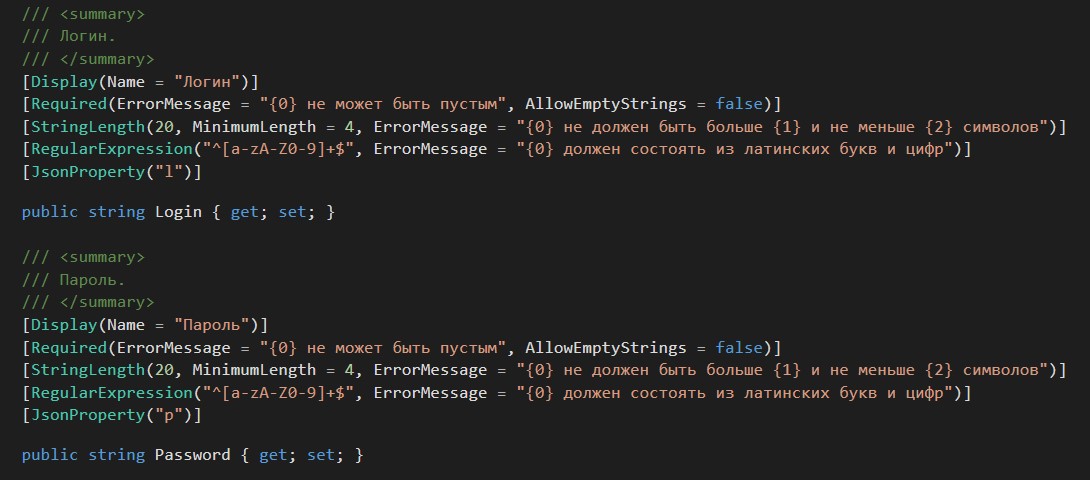
HandyControls doesn't use finished attributes of System.ComponentModel.DataAnnotation to data validation. For instance these attributes: Display, Required, StringLength, RegularExpression.
It was done in "Material Design In XAML".
Describe the solution you'd like
I wish that TextBox, PasswordBox use the aforementioned attributes for date validation instead of imbedded text for errors.
Additional context
It is my class with attributes:
MaterialDesignXaml displayed:

MaterialDesignXaml code:
<TextBox material:HintAssist.Hint="Логин"
		 Text="{Binding LoginUser.Login, UpdateSourceTrigger=PropertyChanged, ValidatesOnDataErrors=True}"/>
Contributor guide
No contributing guide indexed for this repository
First steps
- Read the whole issue, then the project's contributing guide.
- Comment on the issue to say you are picking it up — it saves two people doing the same work.
- Fork the repository and make your change on a branch.
- Open a pull request that references the issue number.
Research direction
Start by examining the HandyControls TextBox and PasswordBox validation behavior, then compare it with the MaterialDesignXaml binding example using ValidatesOnDataErrors=True. Determine how Display, Required, StringLength, and RegularExpression should affect validation messages, and confirm that the requested behavior works for both controls.
Written by the indexing model from the issue text.
Assessment
- Tech stack
- csharp
- Domain
- frontend
- Issue type
- Feature
- Difficulty
- 5/5
- Estimated time
- Over a week
- Activity status
- Stale
- Clarity
- Needs clarification
- Newbie friendliness
- 35/100