HandyOrg / HandyOrg/HandyControl
关于日期时间选择控件改进的一点建议
Open
Nobody has claimed this yet.
:factory: enhancement
- Dominant language
- C#
- Stars
- 7.2k
- Forks
- 1.2k
- PR merge metrics
- No merged PRs in 30d
Description
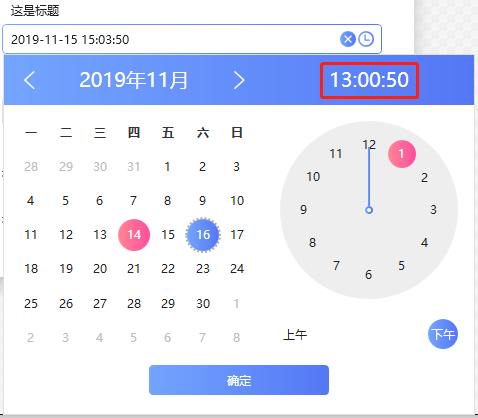
时间选择控件在实际的使用中,对于时分秒的精确选择不是很方便。对于普通的用户来说,他们甚至不知道可以去点击表盘来选择时间。如果需要刻意去选择时间,通常会去点击红色方框时间那个地方:
能否对日期时间选择控件做一点改进呢?在点击时间时,会弹出24小时制的时间选择器:
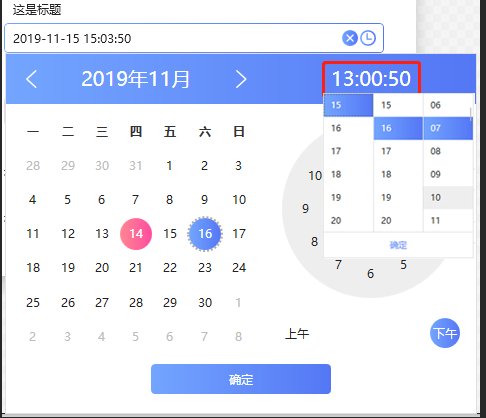
或者将时间的显示控件改为可以输入的控件呢?
Contributor guide
No contributing guide indexed for this repository
First steps
- Read the whole issue, then the project's contributing guide.
- Comment on the issue to say you are picking it up — it saves two people doing the same work.
- Fork the repository and make your change on a branch.
- Open a pull request that references the issue number.
Research direction
Start by locating the WPF date-time picker control and reviewing its current time-selection behavior against the screenshots in the issue. Clarify whether the desired outcome is a 24-hour time picker, an editable time display, or both; completion should be confirmed by maintainers because the issue does not define one acceptance path.
Written by the indexing model from the issue text.
Assessment
- Tech stack
- csharp
- Domain
- desktop
- Issue type
- Feature
- Difficulty
- 5/5
- Estimated time
- Over a week
- Activity status
- Stale
- Clarity
- Needs clarification
- Newbie friendliness
- 25/100