Letter Spacing Adjustment for Custom Fonts
- Dominant language
- Python
- Stars
- 4.7k
- Forks
- 604
- PR merge metrics
- No merged PRs in 30d
Description
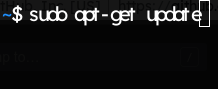
I'm attempting to change the font of the application from preferences > appearance, however the custom font I am attempting to use has odd letter spacing and overlapping issues. Poking around the preferences I see no option to adjust this, only a slider to adjust the font size. It would be nice to have this feature so that a user could adjust letter spacing for custom fonts of their choice. I do understand most users might just use the system default so this isn't critical.
System Specs:
Intel Core i7-6700K
32GB DDR4 RAM
Ubuntu 19.04
```
$ guake --version
Guake Terminal: 3.4.0
VTE: 0.56.2
VTE runtime: 0.56.2
Gtk: 3.24.8
```
This is the custom font I am trying to use:
https://www.lexend.com/
Contributor guide
No contributing guide indexed for this repository
Assessment
This issue has not been assessed yet.